> ## Documentation Index
> Fetch the complete documentation index at: https://docs.toolip.io/llms.txt
> Use this file to discover all available pages before exploring further.

# How to Configure Your Proxy

> Configure your toolip Global ISP Proxy settings with ease.

Prefer an enterprise-grade guide? Learn more about Oculus Proxies <a href="https://docs.oculusproxies.com/proxy-networks/isp-premium/configure" target="_blank" rel="noopener">ISP Premium Proxies Configuration</a>.

<Steps>
  <Step title="Generate Your Proxy">
    Click the **Generate proxy** button to generate your proxy.

    <Frame>
      <img src="https://mintcdn.com/toolip-d3ca8ce9/MMJbujYNf18N3KVj/proxy-networks/img/configureISP1.png?fit=max&auto=format&n=MMJbujYNf18N3KVj&q=85&s=0ae3c7f1dede827e556b25c7339c3236" alt="" width="994" height="195" data-path="proxy-networks/img/configureISP1.png" />
    </Frame>
  </Step>

  <Step title="Choose a country">
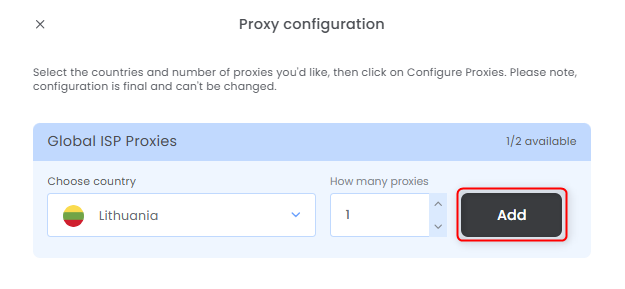
    Select the countries, how many proxies for each one and press **Add**.
    <Frame>
      <img src="https://mintcdn.com/toolip-d3ca8ce9/MMJbujYNf18N3KVj/proxy-networks/img/configureISP2.png?fit=max&auto=format&n=MMJbujYNf18N3KVj&q=85&s=9d8837e021d5d8951d257bd503c587bf" alt="" width="625" height="289" data-path="proxy-networks/img/configureISP2.png" />
    </Frame>
  </Step>

  <Step title="Get Your Proxy Details">
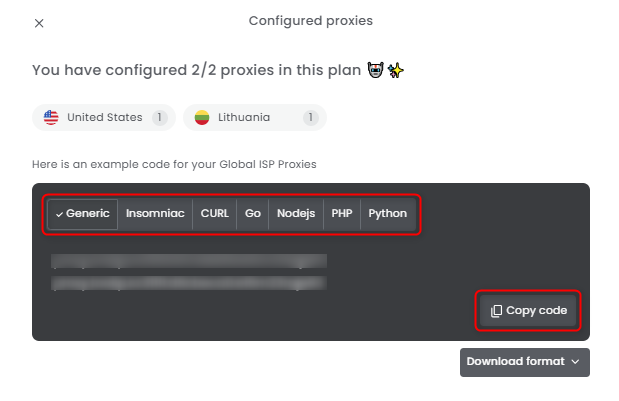
    Select the desired format and copy the proxy details to your clipboard.
    <Frame>
      <img src="https://mintcdn.com/toolip-d3ca8ce9/MMJbujYNf18N3KVj/proxy-networks/img/configureISP3.png?fit=max&auto=format&n=MMJbujYNf18N3KVj&q=85&s=890aaf861c3503d9582d29cf96e15e8c" alt="" width="619" height="401" data-path="proxy-networks/img/configureISP3.png" />
    </Frame>
  </Step>

  <Step title="Download Proxy Credentials">
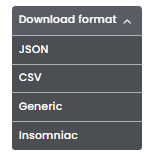
    You can also click **Download Format** to quickly save the credentials as a file.
    <Frame>
      <img src="https://mintcdn.com/toolip-d3ca8ce9/MMJbujYNf18N3KVj/proxy-networks/img/configureISP4.png?fit=max&auto=format&n=MMJbujYNf18N3KVj&q=85&s=445b1141154de9bdf869468d45d15a35" alt="" width="151" height="158" data-path="proxy-networks/img/configureISP4.png" />
    </Frame>
  </Step>

  <Step title="Reconfigure">
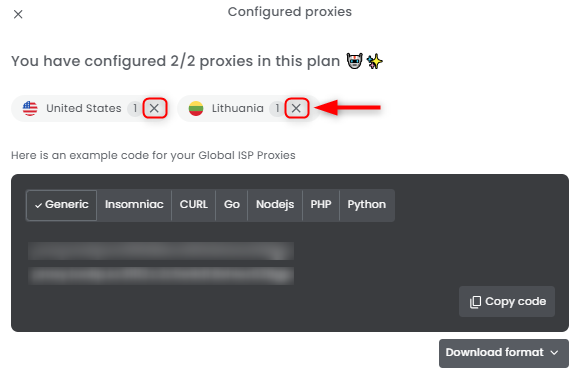
    Need to correct a mistake, get a new IP, rotate, refresh or reconfigure your proxy? No problem! Simply click the `X` symbol next to the proxy's country to **remove it** and set up a **new configuration**.
    <Frame>
      <img src="https://mintcdn.com/toolip-d3ca8ce9/MMJbujYNf18N3KVj/proxy-networks/img/configureISP5.png?fit=max&auto=format&n=MMJbujYNf18N3KVj&q=85&s=5fb9a6c8c98e8860380483256c0409ff" alt="" width="575" height="376" data-path="proxy-networks/img/configureISP5.png" />
    </Frame>
  </Step>
</Steps>
