> ## Documentation Index
> Fetch the complete documentation index at: https://docs.toolip.io/llms.txt
> Use this file to discover all available pages before exploring further.

# How to Configure Your Proxy

> Configure your toolip Shared Datacenter Proxy settings with ease.

Prefer an enterprise-grade guide? Learn more about Oculus Proxies <a href="https://docs.oculusproxies.com/proxy-networks/shared-datacenter/configure" target="_blank" rel="noopener">Shared Datacenter Proxies Configuration</a>.

<Steps>
  <Step title="Generate Your Proxy">
    Click the **Generate proxy** button to generate your proxy.

    <Frame>
      <img src="https://mintcdn.com/toolip-d3ca8ce9/MMJbujYNf18N3KVj/proxy-networks/img/configureSDC1.png?fit=max&auto=format&n=MMJbujYNf18N3KVj&q=85&s=39a4a91c9396d54e19a0a658633da7eb" alt="" width="995" height="134" data-path="proxy-networks/img/configureSDC1.png" />
    </Frame>
  </Step>

  <Step title="Choose a country">
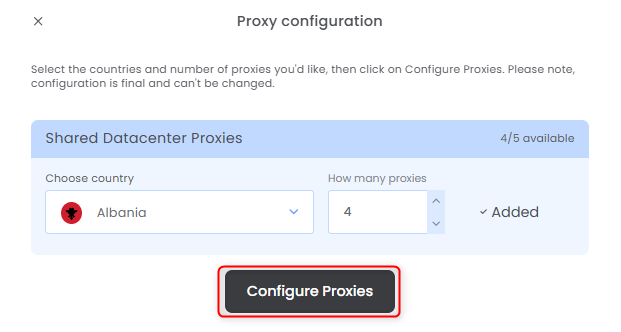
    Select the countries, how many proxies for each one and press **Configure Proxies**.
    <Frame>
      <img src="https://mintcdn.com/toolip-d3ca8ce9/MMJbujYNf18N3KVj/proxy-networks/img/configureSDC2.png?fit=max&auto=format&n=MMJbujYNf18N3KVj&q=85&s=3d1d043a0e8e469879d572fe610cd392" alt="" width="621" height="332" data-path="proxy-networks/img/configureSDC2.png" />
    </Frame>
  </Step>

  <Step title="Get Your Proxy Details">
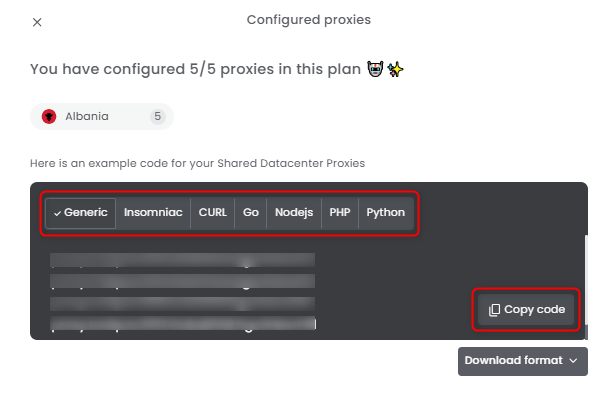
    Select the desired format and copy the proxy details to your clipboard.
    <Frame>
      <img src="https://mintcdn.com/toolip-d3ca8ce9/MMJbujYNf18N3KVj/proxy-networks/img/configureSDC3.png?fit=max&auto=format&n=MMJbujYNf18N3KVj&q=85&s=a985b8dd068f6595b680303f2276e150" alt="" width="615" height="416" data-path="proxy-networks/img/configureSDC3.png" />
    </Frame>
  </Step>

  <Step title="Download Proxy Credentials">
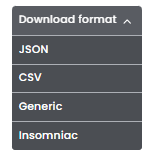
    You can also click **Download Format** to quickly save the credentials as a file.
    <Frame>
      <img src="https://mintcdn.com/toolip-d3ca8ce9/MMJbujYNf18N3KVj/proxy-networks/img/configureSDC4.png?fit=max&auto=format&n=MMJbujYNf18N3KVj&q=85&s=d6960c0865d18cd1533723695a94508d" alt="" width="151" height="158" data-path="proxy-networks/img/configureSDC4.png" />
    </Frame>
  </Step>

  <Step title="Check remaining bandwidth">
    Hover over the pie chart under **Bandwidth (GB)** to view the **remaining bandwidth** for that specific proxy.

    <Frame>
      <img src="https://mintcdn.com/toolip-d3ca8ce9/MMJbujYNf18N3KVj/proxy-networks/img/configureSDC6.png?fit=max&auto=format&n=MMJbujYNf18N3KVj&q=85&s=439c16375a2e8f7a41a75384a74eebdd" alt="" width="1106" height="145" data-path="proxy-networks/img/configureSDC6.png" />
    </Frame>
  </Step>

  <Step title="Reconfigure">
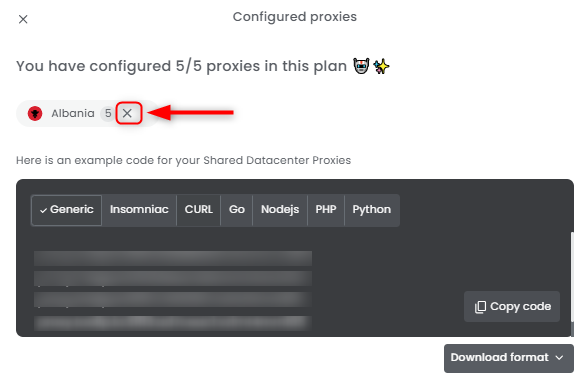
    Need to correct a mistake, get a new IP, rotate, refresh or reconfigure your proxy? No problem! Simply click the `X` symbol next to the proxy's country to **remove it** and set up a **new configuration**.
    <Frame>
      <img src="https://mintcdn.com/toolip-d3ca8ce9/MMJbujYNf18N3KVj/proxy-networks/img/configureSDC5.png?fit=max&auto=format&n=MMJbujYNf18N3KVj&q=85&s=301e4ce8d4aa765d1e97ab5ca9e55f28" alt="" width="585" height="385" data-path="proxy-networks/img/configureSDC5.png" />
    </Frame>
  </Step>
</Steps>
