> ## Documentation Index
> Fetch the complete documentation index at: https://docs.toolip.io/llms.txt
> Use this file to discover all available pages before exploring further.
# How to Configure Your Proxy
> Configure your toolip Rotaing Residential Proxy settings with ease.
Prefer an enterprise-grade guide? Learn more about Oculus Proxies Rotating Residential Proxies Configuration.
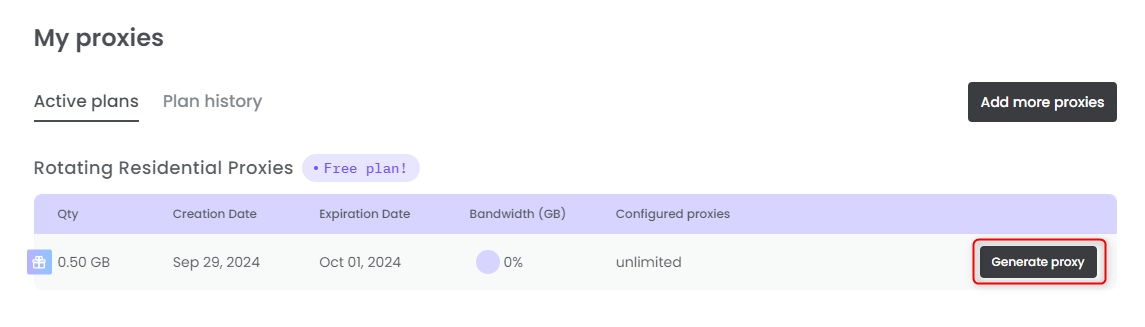
Click the **Generate proxy** button to create your proxy.
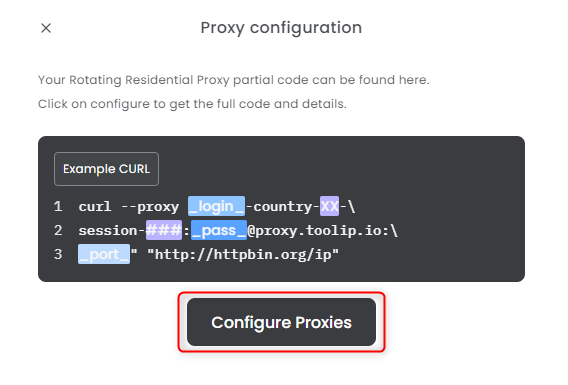
 Click the **Configure Proxies** button to get the complete code.
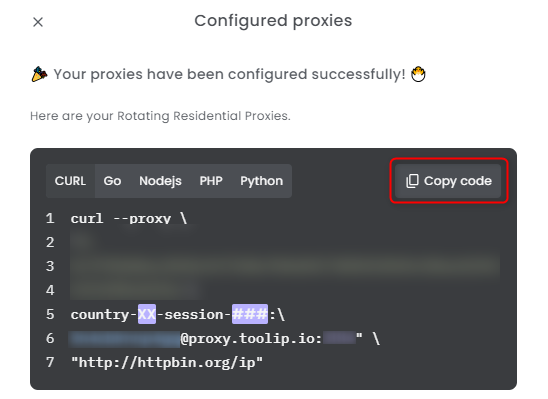
 Copy the provided code to set up your proxy, replacing `XX` with your desired country and `###` with the number of sessions.
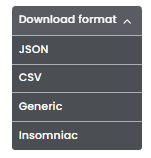
 You can also click **Download Format** to quickly save the credentials as a file.
 Hover over the pie chart under **Bandwidth (GB)** to view the **remaining bandwidth** for that specific proxy.
 Working with **HTTPS** or **SOCKS5**? Don't forget to download the
[SSL certificate](https://docs.toolip.io/proxy-networks/rotating-residential/ssl-certificate)
Rotating Residential **does not support POST requests** and operates in **read-only mode**.
Working with **HTTPS** or **SOCKS5**? Don't forget to download the
[SSL certificate](https://docs.toolip.io/proxy-networks/rotating-residential/ssl-certificate)
Rotating Residential **does not support POST requests** and operates in **read-only mode**.