> ## Documentation Index
> Fetch the complete documentation index at: https://docs.toolip.io/llms.txt
> Use this file to discover all available pages before exploring further.

# How to Configure Your Proxy

> Configure your toolip Dedicated Datacenter Proxy settings with ease.

Prefer an enterprise-grade guide? Learn more about Oculus Proxies <a href="https://docs.oculusproxies.com/proxy-networks/dedicated-datacenter/configure" target="_blank" rel="noopener">Dedicated Datacenter Proxies Configuration</a>.

<Steps>
  <Step title="Generate Your Proxy">
    Click the **Generate proxy** button to generate your proxy.

    <Frame>
      <img src="https://mintcdn.com/toolip-d3ca8ce9/mPVR9VcnRd7pGe8I/proxy-networks/img/configureDDC1.png?fit=max&auto=format&n=mPVR9VcnRd7pGe8I&q=85&s=64288bd5e7814f31c32ca93590ffe40d" alt="" width="1025" height="143" data-path="proxy-networks/img/configureDDC1.png" />
    </Frame>
  </Step>

  <Step title="Choose a country">
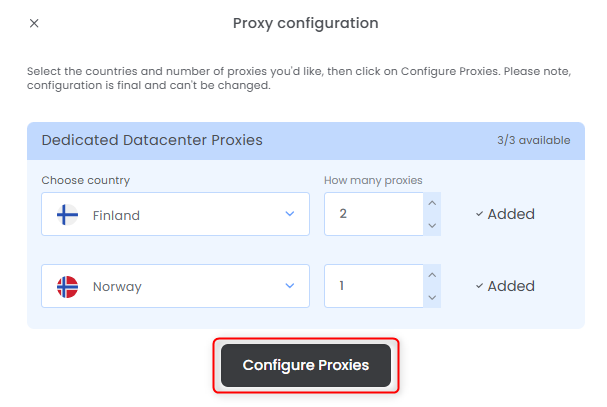
    Select the countries, how many proxies for each one and press **Configure Proxies**.
    <Frame>
      <img src="https://mintcdn.com/toolip-d3ca8ce9/mPVR9VcnRd7pGe8I/proxy-networks/img/configureDDC2.png?fit=max&auto=format&n=mPVR9VcnRd7pGe8I&q=85&s=3161af08e024aed374fc35c6d5042492" alt="" width="607" height="407" data-path="proxy-networks/img/configureDDC2.png" />
    </Frame>
  </Step>

  <Step title="Get Your Proxy Details">
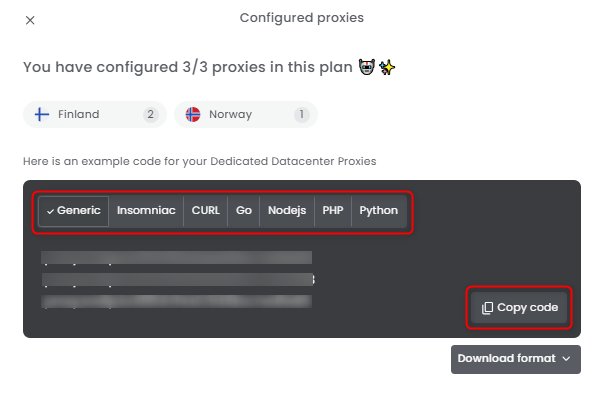
    Select the desired format and copy the proxy details to your clipboard.
    <Frame>
      <img src="https://mintcdn.com/toolip-d3ca8ce9/mPVR9VcnRd7pGe8I/proxy-networks/img/configureDDC3.png?fit=max&auto=format&n=mPVR9VcnRd7pGe8I&q=85&s=1912d8446d299802e3c49e4eddbce1a9" alt="" width="605" height="399" data-path="proxy-networks/img/configureDDC3.png" />
    </Frame>
  </Step>

  <Step title="Download Proxy Credentials">
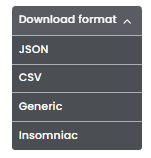
    You can also click **Download Format** to quickly save the credentials as a file.
    <Frame>
      <img src="https://mintcdn.com/toolip-d3ca8ce9/mPVR9VcnRd7pGe8I/proxy-networks/img/configureDDC4.png?fit=max&auto=format&n=mPVR9VcnRd7pGe8I&q=85&s=5ac6715af7c72ed5edc93e905a3399dc" alt="" width="151" height="158" data-path="proxy-networks/img/configureDDC4.png" />
    </Frame>
  </Step>

  <Step title="Check remaining bandwidth">
    Hover over the pie chart under **Bandwidth (GB)** to view the **remaining bandwidth** for that specific proxy.

    <Frame>
      <img src="https://mintcdn.com/toolip-d3ca8ce9/MMJbujYNf18N3KVj/proxy-networks/img/configureDDC6.png?fit=max&auto=format&n=MMJbujYNf18N3KVj&q=85&s=aea2a19a1fbfa9eea8c6e52d322fc73e" alt="" width="1149" height="151" data-path="proxy-networks/img/configureDDC6.png" />
    </Frame>
  </Step>

  <Step title="Reconfigure">
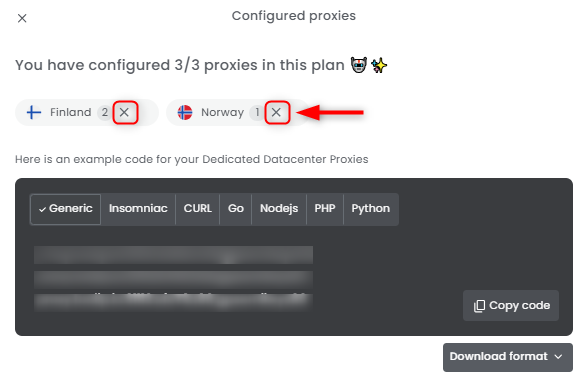
    Need to correct a mistake, get a new IP, rotate, refresh or reconfigure your proxy? No problem! Simply click the `X` symbol next to the proxy's country to **remove it** and set up a **new configuration**.
    <Frame>
      <img src="https://mintcdn.com/toolip-d3ca8ce9/mPVR9VcnRd7pGe8I/proxy-networks/img/configureDDC5.png?fit=max&auto=format&n=mPVR9VcnRd7pGe8I&q=85&s=3e9526a8ca9c44097c1da719d6284cce" alt="" width="582" height="381" data-path="proxy-networks/img/configureDDC5.png" />
    </Frame>
  </Step>
</Steps>
