> ## Documentation Index
> Fetch the complete documentation index at: https://docs.toolip.io/llms.txt
> Use this file to discover all available pages before exploring further.

# Paying for Your Order

> Complete your purchase effortlessly using one of our supported payment methods. Just follow these simple steps to pick the option that works best for you.

Prefer an enterprise-grade guide? Learn more about Oculus Proxies <a href="https://docs.oculusproxies.com/pricing-billing/payments" target="_blank" rel="noopener">Payments</a>.

<Tabs>
  <Tab title="How to purchase">
    <Steps>
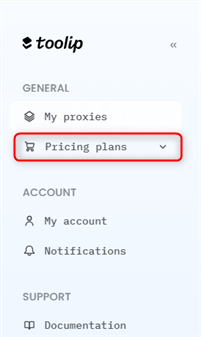
      <Step title="Access Pricing Plans">
        Open the [pricing plans](https://toolip.io/dashboard/page/pricing) page inside your Toolip dashboard.
        <Frame>
          <img src="https://mintcdn.com/toolip-d3ca8ce9/MMJbujYNf18N3KVj/proxy-networks/img/pricing-plans.png?fit=max&auto=format&n=MMJbujYNf18N3KVj&q=85&s=56f7bfc566bee5903c6fdce9e0ac08e5" alt="" width="201" height="337" data-path="proxy-networks/img/pricing-plans.png" />
        </Frame>
      </Step>

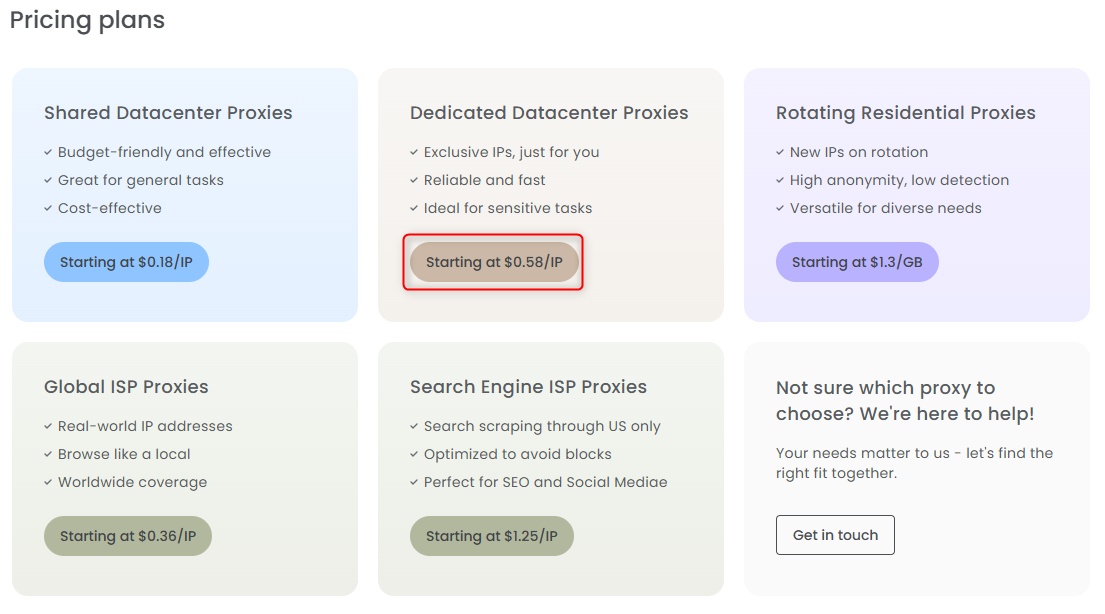
      <Step title="Select a Proxy">
        Choose the proxy that best fits **your needs**.
        <Frame>
          <img src="https://mintcdn.com/toolip-d3ca8ce9/MMJbujYNf18N3KVj/proxy-networks/img/select-product.png?fit=max&auto=format&n=MMJbujYNf18N3KVj&q=85&s=111aa3454eeb91e3c2f927842337a155" alt="" width="1105" height="614" data-path="proxy-networks/img/select-product.png" />
        </Frame>
      </Step>

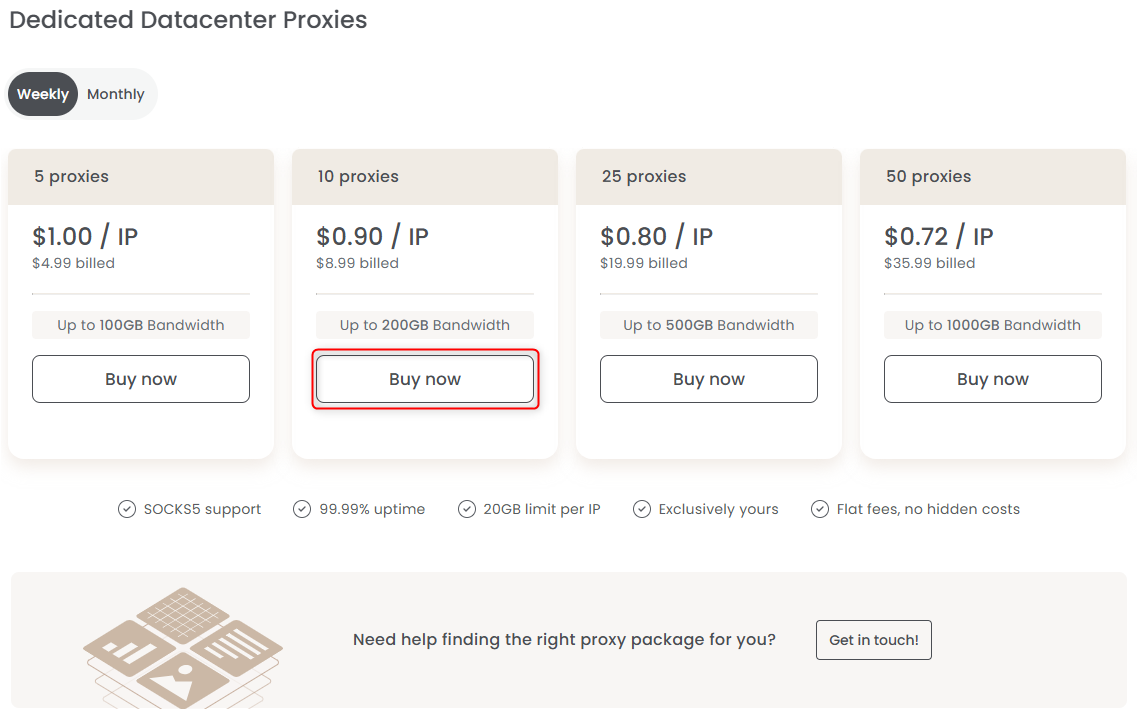
      <Step title="Choose a Plan">
        Select the plan you wish to purchase and click **Buy Now** to proceed.
        <Frame>
          <img src="https://mintcdn.com/toolip-d3ca8ce9/MMJbujYNf18N3KVj/proxy-networks/img/select-plan.png?fit=max&auto=format&n=MMJbujYNf18N3KVj&q=85&s=509cb931945fb89598063c7208cf869f" alt="" width="1142" height="724" data-path="proxy-networks/img/select-plan.png" />
        </Frame>
      </Step>

      <Step title="Complete Your Payment">
        Select your preferred payment method and finalize the transaction.
        <Warning>Toolip **does not accept crypto** payments</Warning>

        <Tabs>
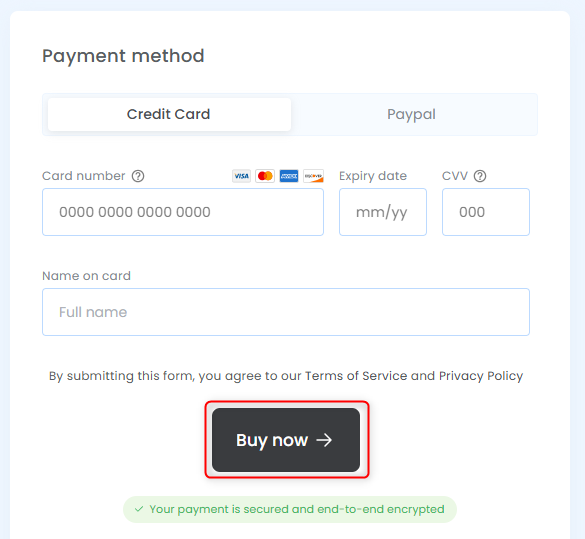
          <Tab title="Credit Card">
            Choose **Credit Card** and follow the instructions to complete the payment.
            <Frame>
              <img src="https://mintcdn.com/toolip-d3ca8ce9/mPVR9VcnRd7pGe8I/proxy-networks/img/checkout-toolip-card.png?fit=max&auto=format&n=mPVR9VcnRd7pGe8I&q=85&s=fa8f60bea8a598a457ad2f522bd90a51" alt="" width="585" height="539" data-path="proxy-networks/img/checkout-toolip-card.png" />
            </Frame>
          </Tab>

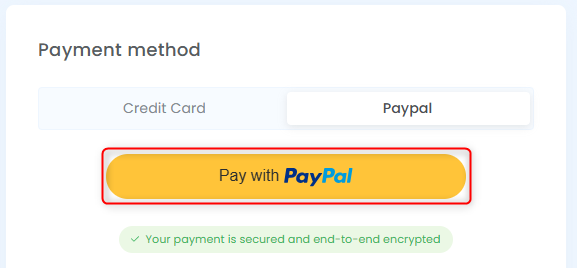
          <Tab title="PayPal">
            Select **PayPal**, log in to your account, and confirm your payment.
            <Frame>
              <img src="https://mintcdn.com/toolip-d3ca8ce9/mPVR9VcnRd7pGe8I/proxy-networks/img/checkout-toolip-paypal.png?fit=max&auto=format&n=mPVR9VcnRd7pGe8I&q=85&s=c08d9e57b8e0824c6947808ebc2afad8" alt="" width="577" height="268" data-path="proxy-networks/img/checkout-toolip-paypal.png" />
            </Frame>
          </Tab>

          <Tab title="Google Pay">
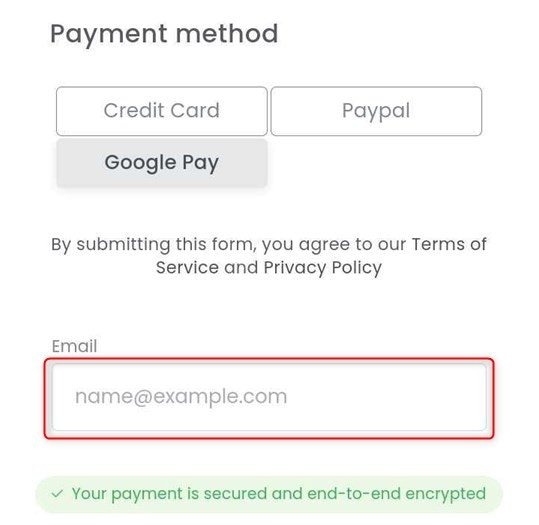
            Choose **Google Pay** and proceed with the payment.

            <Warning>
              This payment method is only available for Android devices.
            </Warning>

            <Frame>
              <img src="https://mintcdn.com/toolip-d3ca8ce9/mPVR9VcnRd7pGe8I/pricing-billing/img/toolip-google-pay.png?fit=max&auto=format&n=mPVR9VcnRd7pGe8I&q=85&s=40ad67ba08b02a2e0cc8f1a7f7138da2" alt="" width="539" height="525" data-path="pricing-billing/img/toolip-google-pay.png" />
            </Frame>
          </Tab>
        </Tabs>
      </Step>
    </Steps>
  </Tab>

  <Tab title="How to view receipts">
    <Warning>
      Viewing receipts is available only for **Stripe** payments
    </Warning>

    <Steps>
      <Step title="Head to Subscriptions Page">
        Open the [Active subscriptions page](https://toolip.io/dashboard/page/account/section/active) to see your current proxies.
      </Step>

      <Step title="Select a Proxy">
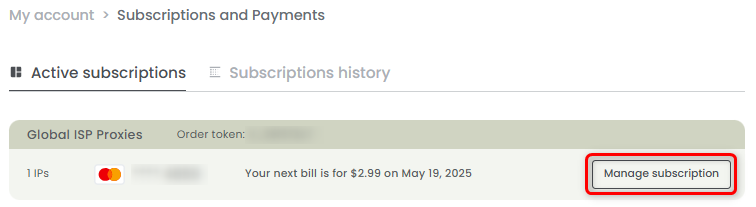
        Choose the proxy of the receipt you want to download and press **Manage subscription**.
        <Frame>
          <img src="https://mintcdn.com/toolip-d3ca8ce9/mPVR9VcnRd7pGe8I/pricing-billing/img/recipt_toolip1.png?fit=max&auto=format&n=mPVR9VcnRd7pGe8I&q=85&s=501fb7ec5928636c5d3989d6fe330fb4" alt="" width="756" height="207" data-path="pricing-billing/img/recipt_toolip1.png" />
        </Frame>
      </Step>

      <Step title="Open Receipt">
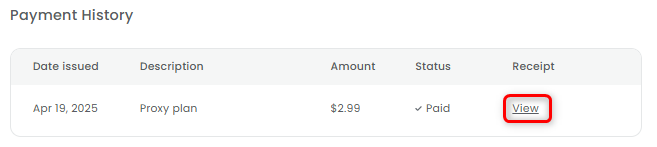
        Under **Payment History**, press **View** to open and download the receipt.
        <Frame>
          <img src="https://mintcdn.com/toolip-d3ca8ce9/mPVR9VcnRd7pGe8I/pricing-billing/img/recipt_toolip2.png?fit=max&auto=format&n=mPVR9VcnRd7pGe8I&q=85&s=469a5e2ea00149270558a068e5978ab2" alt="" width="657" height="147" data-path="pricing-billing/img/recipt_toolip2.png" />
        </Frame>
      </Step>
    </Steps>
  </Tab>
</Tabs>
