> ## Documentation Index
> Fetch the complete documentation index at: https://docs.toolip.io/llms.txt
> Use this file to discover all available pages before exploring further.
# Switch to Monthly plan
> Thinking about switching from your weekly plan to a monthly one? Great choice! Follow this guide to get started.
Prefer an enterprise-grade guide? Learn more about Oculus Proxies Monthly Plan.
Once you switch to a monthly plan, reverting back to a weekly plan is not possible!
Open the [Active subscriptions page](https://toolip.io/dashboard/page/account/section/active?lang=en) to see your current proxies.
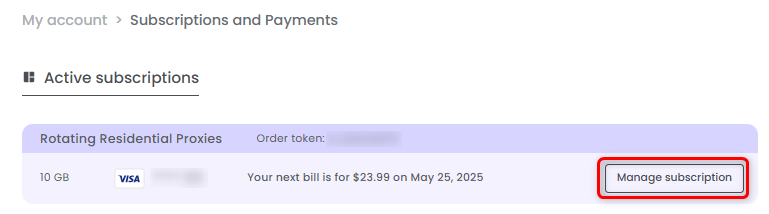
Select the proxy you'd like to change to a monthly subscription, and press **Manage subscription**.
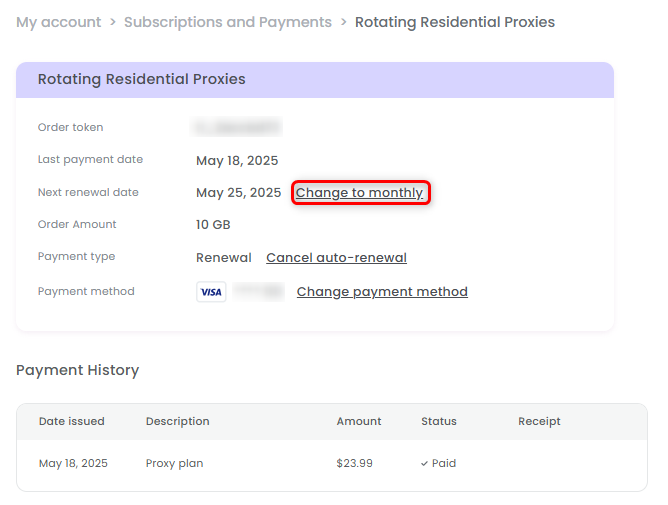
 Press **Change to monthly** next to the renewal date.
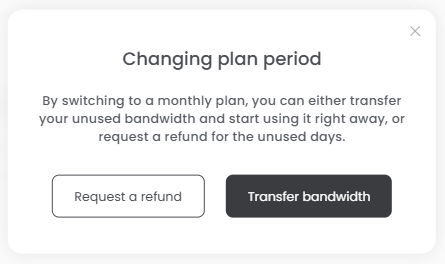
 Now you have two options:
1. **Receive a refund -** Get a refund for the unused days of your current plan and switch to a monthly subscription.
For example, if you cancel after 3 days, you’ll receive a credit for the remaining 4 days, provided you purchase a new plan.
2. **Transfer bandwidth -** Carry over your remaining bandwidth from the current plan and apply it to your new monthly plan.
Now you have two options:
1. **Receive a refund -** Get a refund for the unused days of your current plan and switch to a monthly subscription.
For example, if you cancel after 3 days, you’ll receive a credit for the remaining 4 days, provided you purchase a new plan.
2. **Transfer bandwidth -** Carry over your remaining bandwidth from the current plan and apply it to your new monthly plan.