> ## Documentation Index
> Fetch the complete documentation index at: https://docs.toolip.io/llms.txt
> Use this file to discover all available pages before exploring further.
# How to Set Up Toolip With WebHarvy
> Enhance your web scraping capabilities by integrating Toolip with WebHarvy. This guide will walk you through configuring proxies to ensure secure, efficient, and anonymous data collection.
 ## What is WebHarvy?
**WebHarvy** is an intuitive point-and-click web scraping software that enables users to extract data from websites without coding. With its built-in browser, automation features, and scheduling capabilities, WebHarvy is ideal for scraping large volumes of data efficiently. By integrating **Toolip**, you can ensure uninterrupted, anonymous scraping while bypassing geo-restrictions and IP bans.
Prefer an enterprise-grade guide? Learn more about Oculus Proxies Webharvy Integration Guide.
Targeting search engines like Google, Bing, or Yandex requires a specialized proxy to ensure stable access and avoid blocks. **Toolip’s Search Engine ISP Proxies** are designed specifically for this, providing reliable performance where standard proxies may fail. If your proxy test isn't working on search engines, switching to **Search Engine ISP Proxies** can resolve the issue.
## How to Set Up Toolip With WebHarvy
1\. Visit the official [WebHarvy website](https://www.webharvy.com/) and download the application.
2\. Follow the installation instructions to complete the setup.
3\. Launch WebHarvy and log in using your credentials.
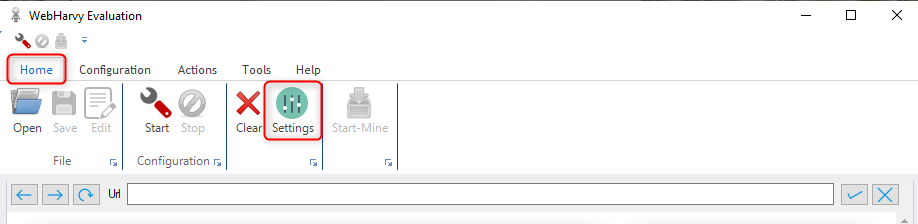
1\. Open WebHarvy and click on the **Settings** menu under the **Home** tab.
## What is WebHarvy?
**WebHarvy** is an intuitive point-and-click web scraping software that enables users to extract data from websites without coding. With its built-in browser, automation features, and scheduling capabilities, WebHarvy is ideal for scraping large volumes of data efficiently. By integrating **Toolip**, you can ensure uninterrupted, anonymous scraping while bypassing geo-restrictions and IP bans.
Prefer an enterprise-grade guide? Learn more about Oculus Proxies Webharvy Integration Guide.
Targeting search engines like Google, Bing, or Yandex requires a specialized proxy to ensure stable access and avoid blocks. **Toolip’s Search Engine ISP Proxies** are designed specifically for this, providing reliable performance where standard proxies may fail. If your proxy test isn't working on search engines, switching to **Search Engine ISP Proxies** can resolve the issue.
## How to Set Up Toolip With WebHarvy
1\. Visit the official [WebHarvy website](https://www.webharvy.com/) and download the application.
2\. Follow the installation instructions to complete the setup.
3\. Launch WebHarvy and log in using your credentials.
1\. Open WebHarvy and click on the **Settings** menu under the **Home** tab.
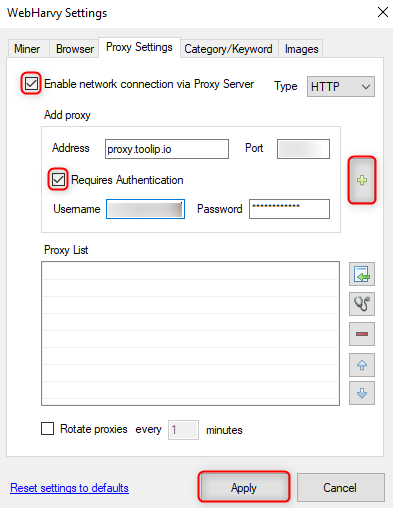
 1\. Navigate to the **Proxy Settings** tab.
2\. Check **Enable network connection via Proxy Server**.
3\. Enable **Requires Authentication** to enter login credentials.
4\. Fill in your Toolip proxy details:
* **Address**: `proxy.toolip.io`
* **Port**: Enter the port number from your [Toolip dashboard](https://toolip.io/dashboard/page/plans).
* **Username**: Your Toolip username.
* **Password**: Your Toolip password.
5\. Click the **Plus (+)** button to add the proxy.
6\. Click **Apply** to save your settings.
1\. Navigate to the **Proxy Settings** tab.
2\. Check **Enable network connection via Proxy Server**.
3\. Enable **Requires Authentication** to enter login credentials.
4\. Fill in your Toolip proxy details:
* **Address**: `proxy.toolip.io`
* **Port**: Enter the port number from your [Toolip dashboard](https://toolip.io/dashboard/page/plans).
* **Username**: Your Toolip username.
* **Password**: Your Toolip password.
5\. Click the **Plus (+)** button to add the proxy.
6\. Click **Apply** to save your settings.
 For geo-targeted proxies, modify your username to include a country code (e.g., `your-username-country-US`) to use a specific location.
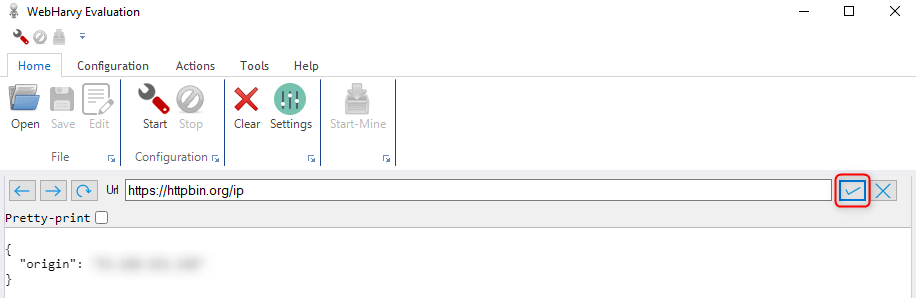
1\. Start a new scraping session in WebHarvy.
2\. To verify your proxy, scrape a website that displays your IP, such as [httpbin.org/ip](http://httpbin.org/ip).
3\. Click the **Check Mark** button to begin scraping and confirm that the displayed IP matches your Toolip proxy.
For geo-targeted proxies, modify your username to include a country code (e.g., `your-username-country-US`) to use a specific location.
1\. Start a new scraping session in WebHarvy.
2\. To verify your proxy, scrape a website that displays your IP, such as [httpbin.org/ip](http://httpbin.org/ip).
3\. Click the **Check Mark** button to begin scraping and confirm that the displayed IP matches your Toolip proxy.
 Your **Toolip** proxies are now successfully integrated with **WebHarvy**, allowing you to conduct secure and efficient web scraping. With this setup, you can bypass IP bans, access geo-restricted content, and manage large-scale data collection effortlessly. Happy scraping!