> ## Documentation Index
> Fetch the complete documentation index at: https://docs.toolip.io/llms.txt
> Use this file to discover all available pages before exploring further.
# How to Set Up Toolip With Undetectable
> Learn how to configure Toolip in Undetectable for secure and anonymous browsing. This step-by-step guide will help you enhance your online privacy and efficiency.
 ## What is Undetectable?
**Undetectable** is an anti-detect browser that enables secure and anonymous browsing by creating multiple browser profiles with unique digital fingerprints. It's perfect for managing multiple accounts, web scraping, and other activities requiring privacy and security.
Prefer an enterprise-grade guide? Learn more about Oculus Proxies Undetectable Integration Guide.
Targeting search engines like Google, Bing, or Yandex requires a specialized proxy to ensure stable access and avoid blocks. **Toolip’s Search Engine ISP Proxies** are designed specifically for this, providing reliable performance where standard proxies may fail. If your proxy test isn't working on search engines, switching to **Search Engine ISP Proxies** can resolve the issue.
## How to Integrate Toolip With Undetectable
1\. Visit the [Undetectable website](https://undetectable.io/) and download the application.
2\. Install the software on your system and log in using your credentials.
1\. Open Undetectable and go to the **Proxy** tab.
## What is Undetectable?
**Undetectable** is an anti-detect browser that enables secure and anonymous browsing by creating multiple browser profiles with unique digital fingerprints. It's perfect for managing multiple accounts, web scraping, and other activities requiring privacy and security.
Prefer an enterprise-grade guide? Learn more about Oculus Proxies Undetectable Integration Guide.
Targeting search engines like Google, Bing, or Yandex requires a specialized proxy to ensure stable access and avoid blocks. **Toolip’s Search Engine ISP Proxies** are designed specifically for this, providing reliable performance where standard proxies may fail. If your proxy test isn't working on search engines, switching to **Search Engine ISP Proxies** can resolve the issue.
## How to Integrate Toolip With Undetectable
1\. Visit the [Undetectable website](https://undetectable.io/) and download the application.
2\. Install the software on your system and log in using your credentials.
1\. Open Undetectable and go to the **Proxy** tab.
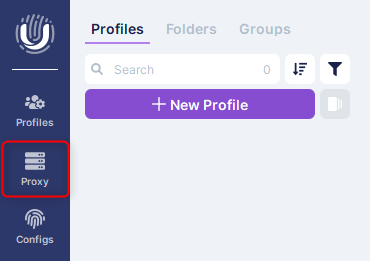 2\. Click on the **Plus** button to add a new proxy.
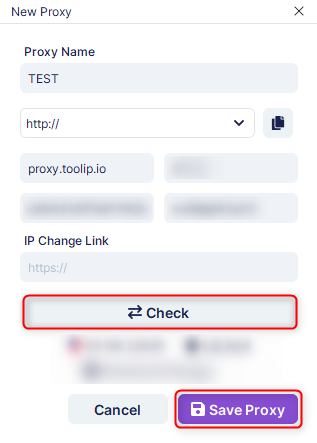
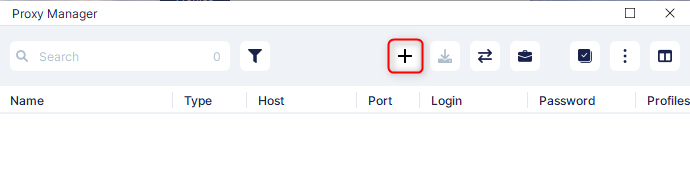 1\. In the proxy setup window:
* Provide a descriptive name in the **Proxy Name** field for easy identification.
* **Type**: Select HTTP or SOCKS5.
* **Host**: `proxy.toolip.io`.
* **Port**: The port number from your [Toolip dashboard](https://toolip.io/dashboard/page/plans).
* **Login**: Your Toolip username.
* **Password**: Your Toolip password.
2\. Click **Check** to verify the connection.
3\. Once verified, click **Save Proxy** to store your proxy settings.
1\. In the proxy setup window:
* Provide a descriptive name in the **Proxy Name** field for easy identification.
* **Type**: Select HTTP or SOCKS5.
* **Host**: `proxy.toolip.io`.
* **Port**: The port number from your [Toolip dashboard](https://toolip.io/dashboard/page/plans).
* **Login**: Your Toolip username.
* **Password**: Your Toolip password.
2\. Click **Check** to verify the connection.
3\. Once verified, click **Save Proxy** to store your proxy settings.
 For geo-targeted proxies, format your username as `your-username-country-XX` (e.g., `your-username-country-US`) to select a specific location.
With your **Toolip** successfully integrated into **Undetectable**, you’re now ready to browse securely and anonymously. Enjoy enhanced privacy and seamless operations!
For geo-targeted proxies, format your username as `your-username-country-XX` (e.g., `your-username-country-US`) to select a specific location.
With your **Toolip** successfully integrated into **Undetectable**, you’re now ready to browse securely and anonymously. Enjoy enhanced privacy and seamless operations!