> ## Documentation Index
> Fetch the complete documentation index at: https://docs.toolip.io/llms.txt
> Use this file to discover all available pages before exploring further.
# How to Set Up Toolip With SwitchyOmega
> Effortlessly manage your proxies with SwitchyOmega! Learn how to integrate Toolip with this browser extension to enhance your privacy, streamline account management, and simplify web scraping workflows.
 ## What is SwitchyOmega?
**SwitchyOmega** is a browser extension for Chrome and Firefox designed to make proxy management easy and efficient. Supporting HTTP, HTTPS, SOCKS4, and SOCKS5, it allows you to create custom rules, switch between proxies effortlessly, and enhance your online activities. Whether you're bypassing geo-restrictions, managing multiple accounts, or safeguarding your privacy, SwitchyOmega is an essential tool for flexible proxy configurations.
Prefer an enterprise-grade guide? Learn more about Oculus Proxies Switchyomega Integration Guide.
Targeting search engines like Google, Bing, or Yandex requires a specialized proxy to ensure stable access and avoid blocks. **Toolip’s Search Engine ISP Proxies** are designed specifically for this, providing reliable performance where standard proxies may fail. If your proxy test isn't working on search engines, switching to **Search Engine ISP Proxies** can resolve the issue.
## How to Set Up Toolip With SwitchyOmega
1\. Visit the relevant extension page for your browser:
* [Chrome Extension](https://chrome.google.com/webstore/detail/proxy-switchyomega/padekgcemlokbadohgkifijomclgjgif?hl=en)
* [Firefox Add-on](https://addons.mozilla.org/en-US/firefox/addon/switchyomega)
2\. Add SwitchyOmega to your browser. After installation, the SwitchyOmega icon will appear in your toolbar.
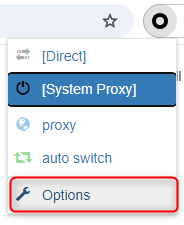
1\. Click the **SwitchyOmega icon** in your browser’s toolbar and select **Options** to open the settings page.
## What is SwitchyOmega?
**SwitchyOmega** is a browser extension for Chrome and Firefox designed to make proxy management easy and efficient. Supporting HTTP, HTTPS, SOCKS4, and SOCKS5, it allows you to create custom rules, switch between proxies effortlessly, and enhance your online activities. Whether you're bypassing geo-restrictions, managing multiple accounts, or safeguarding your privacy, SwitchyOmega is an essential tool for flexible proxy configurations.
Prefer an enterprise-grade guide? Learn more about Oculus Proxies Switchyomega Integration Guide.
Targeting search engines like Google, Bing, or Yandex requires a specialized proxy to ensure stable access and avoid blocks. **Toolip’s Search Engine ISP Proxies** are designed specifically for this, providing reliable performance where standard proxies may fail. If your proxy test isn't working on search engines, switching to **Search Engine ISP Proxies** can resolve the issue.
## How to Set Up Toolip With SwitchyOmega
1\. Visit the relevant extension page for your browser:
* [Chrome Extension](https://chrome.google.com/webstore/detail/proxy-switchyomega/padekgcemlokbadohgkifijomclgjgif?hl=en)
* [Firefox Add-on](https://addons.mozilla.org/en-US/firefox/addon/switchyomega)
2\. Add SwitchyOmega to your browser. After installation, the SwitchyOmega icon will appear in your toolbar.
1\. Click the **SwitchyOmega icon** in your browser’s toolbar and select **Options** to open the settings page.
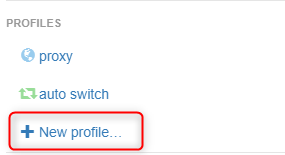
 2\. On the settings page, click **New Profile**.
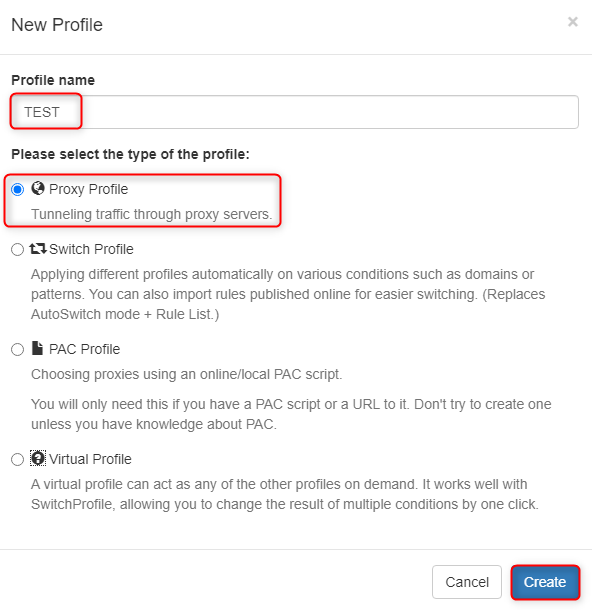
 3\. Provide a descriptive name for your profile (e.g., “Toolip Proxy”), select **Proxy Profile**, and click **Create** to save.
 1\. Enter the following Toolip proxy details in the profile configuration fields:
* **Protocol**: Choose HTTP, HTTPS, or SOCKS5 based on your proxy type.
* **Server**: Input `proxy.toolip.io`.
* **Port**: Enter the port number provided in your [Toolip dashboard](https://toolip.io/dashboard/page/plans).
1\. Enter the following Toolip proxy details in the profile configuration fields:
* **Protocol**: Choose HTTP, HTTPS, or SOCKS5 based on your proxy type.
* **Server**: Input `proxy.toolip.io`.
* **Port**: Enter the port number provided in your [Toolip dashboard](https://toolip.io/dashboard/page/plans).
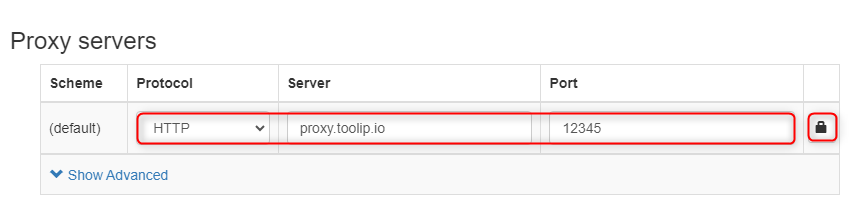 2\. Click the **Lock** icon to add authentication credentials:
* **Username**: Your Toolip username.
* **Password**: Your Toolip password.
3\. Click **Save Changes** to store the proxy configuration.
2\. Click the **Lock** icon to add authentication credentials:
* **Username**: Your Toolip username.
* **Password**: Your Toolip password.
3\. Click **Save Changes** to store the proxy configuration.
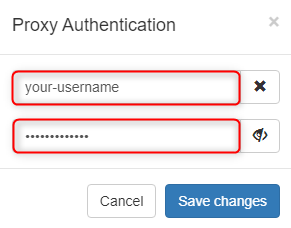 For country-specific proxies, append the country code to your username (e.g., `your-username-country-US`) to select a specific location.
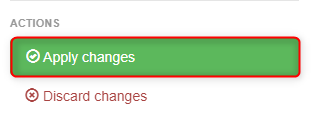
1\. Click **Apply Changes** to finalize your setup.
For country-specific proxies, append the country code to your username (e.g., `your-username-country-US`) to select a specific location.
1\. Click **Apply Changes** to finalize your setup.
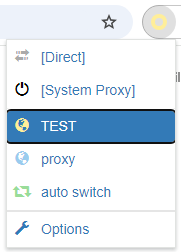
 2\. To enable the proxy, select your configured profile from the SwitchyOmega dropdown menu in the browser toolbar.
 Your Toolip proxies are now fully integrated with SwitchyOmega. Whether you're managing multiple accounts, browsing securely, or scraping data efficiently, this setup ensures flexibility and control over your proxy configurations.