> ## Documentation Index
> Fetch the complete documentation index at: https://docs.toolip.io/llms.txt
> Use this file to discover all available pages before exploring further.
# How to Integrate Toolip with StablerSOLO
> Enhance your data extraction capabilities by integrating Toolip with StablerSOLO. Follow this step-by-step guide to configure your proxy settings seamlessly.
## What is StablerSOLO?
**StablerSOLO** is a data extraction and web scraping service that offers a low-code interface for configuring scrapers. It enables developers and data scientists to extract data efficiently without the need to code custom scrapers for each task.
Prefer an enterprise-grade guide? Learn more about Oculus Proxies Stablersolo Integration Guide.
Targeting search engines like Google, Bing, or Yandex requires a specialized proxy to ensure stable access and avoid blocks. **Toolip’s Search Engine ISP Proxies** are designed specifically for this, providing reliable performance where standard proxies may fail. If your proxy test isn't working on search engines, switching to **Search Engine ISP Proxies** can resolve the issue.
## How to Integrate Toolip With StablerSOLO
1\. Log in to your [StablerSOLO account](https://stabler.tech/).
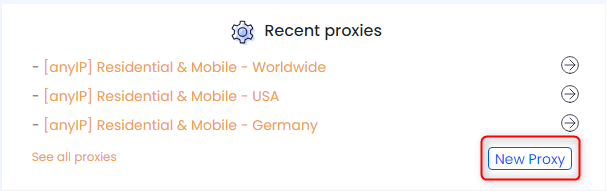
2\. From the main dashboard, scroll to the **Recent Proxies** section at the bottom.
3\. Click on the **New Proxy** button to open the proxy configuration window.
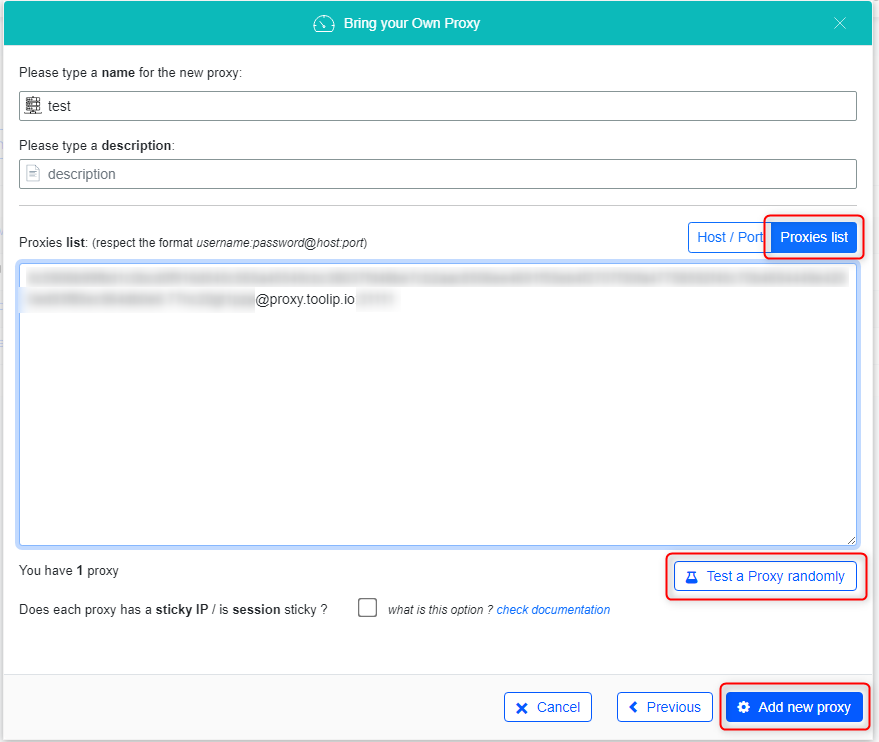
 1\. Switch to the **Proxies List** tab.
2\. Log in to your [Toolip proxy details](https://toolip.io/dashboard).
3\. Click **Show Configured List** under the **Generic** tab to copy your proxy details.
4\. Paste the proxy information into the **Proxies list** field in StablerSOLO.
5\. Click **Test a Proxy Randomly** to verify the connection.
6\. Once the test is successful, click **Add New Proxy** to save your proxy to the list.
1\. Switch to the **Proxies List** tab.
2\. Log in to your [Toolip proxy details](https://toolip.io/dashboard).
3\. Click **Show Configured List** under the **Generic** tab to copy your proxy details.
4\. Paste the proxy information into the **Proxies list** field in StablerSOLO.
5\. Click **Test a Proxy Randomly** to verify the connection.
6\. Once the test is successful, click **Add New Proxy** to save your proxy to the list.
 ## You're All Set!
Integrating **Toolip** with **StablerSOLO** enhances your data extraction processes by providing anonymity, geo-targeting, and improved success rates. Follow this guide to set up your proxies and start scraping efficiently.
## You're All Set!
Integrating **Toolip** with **StablerSOLO** enhances your data extraction processes by providing anonymity, geo-targeting, and improved success rates. Follow this guide to set up your proxies and start scraping efficiently.