> ## Documentation Index
> Fetch the complete documentation index at: https://docs.toolip.io/llms.txt
> Use this file to discover all available pages before exploring further.
# How to Set Up Toolip With Screaming Frog
> Streamline your SEO tasks by integrating Toolip with Screaming Frog. Follow this step-by-step guide to set up proxies for efficient and secure web crawling.
 ## What is Screaming Frog?
**Screaming Frog SEO Spider** is a powerful tool for SEO professionals and website managers. It helps audit websites, detect technical issues, and optimize performance by providing deep insights into site structure and SEO health. By integrating **Toolip** proxies, you can conduct secure, unrestricted, and geo-targeted crawls, ensuring seamless SEO analysis.
Prefer an enterprise-grade guide? Learn more about Oculus Proxies Screaming Frog Integration Guide.
Targeting search engines like Google, Bing, or Yandex requires a specialized proxy to ensure stable access and avoid blocks. **Toolip’s Search Engine ISP Proxies** are designed specifically for this, providing reliable performance where standard proxies may fail. If your proxy test isn't working on search engines, switching to **Search Engine ISP Proxies** can resolve the issue.
## How to Set Up Toolip With Screaming Frog
1\. Visit the official [Screaming Frog website](https://www.screamingfrog.co.uk/seo-spider/).
2\. Download and install the SEO Spider tool for your operating system.
3\. Launch the application after installation is complete.
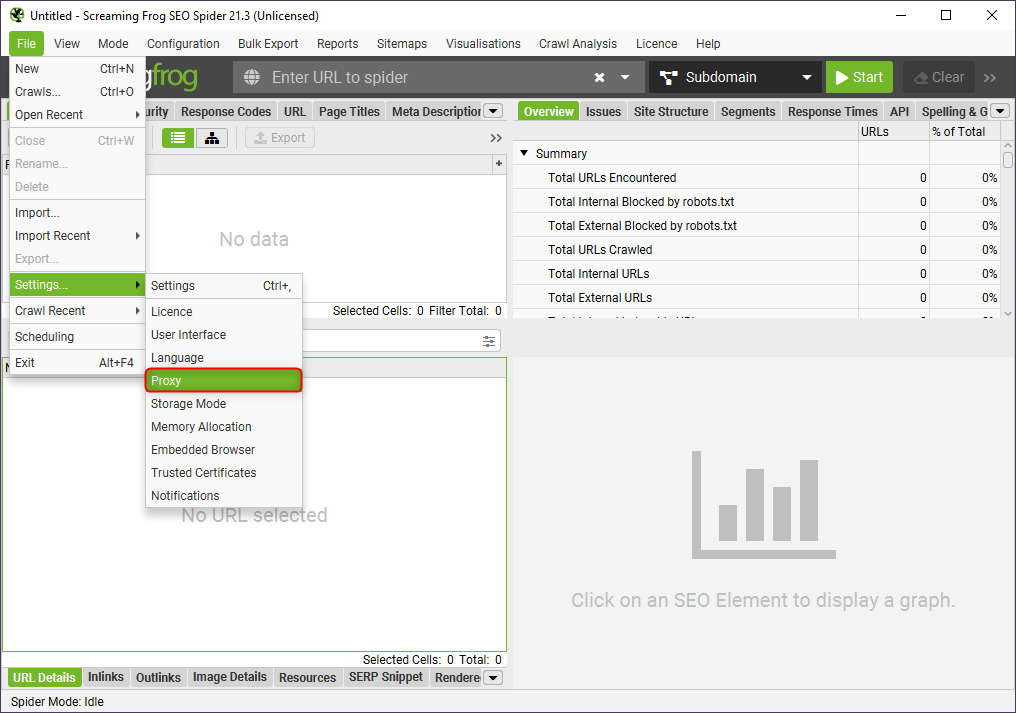
1\. Open **Screaming Frog**.
2\. Click **File** in the top menu.
3\. Select **Settings > Proxy** to open the proxy configuration panel.
## What is Screaming Frog?
**Screaming Frog SEO Spider** is a powerful tool for SEO professionals and website managers. It helps audit websites, detect technical issues, and optimize performance by providing deep insights into site structure and SEO health. By integrating **Toolip** proxies, you can conduct secure, unrestricted, and geo-targeted crawls, ensuring seamless SEO analysis.
Prefer an enterprise-grade guide? Learn more about Oculus Proxies Screaming Frog Integration Guide.
Targeting search engines like Google, Bing, or Yandex requires a specialized proxy to ensure stable access and avoid blocks. **Toolip’s Search Engine ISP Proxies** are designed specifically for this, providing reliable performance where standard proxies may fail. If your proxy test isn't working on search engines, switching to **Search Engine ISP Proxies** can resolve the issue.
## How to Set Up Toolip With Screaming Frog
1\. Visit the official [Screaming Frog website](https://www.screamingfrog.co.uk/seo-spider/).
2\. Download and install the SEO Spider tool for your operating system.
3\. Launch the application after installation is complete.
1\. Open **Screaming Frog**.
2\. Click **File** in the top menu.
3\. Select **Settings > Proxy** to open the proxy configuration panel.
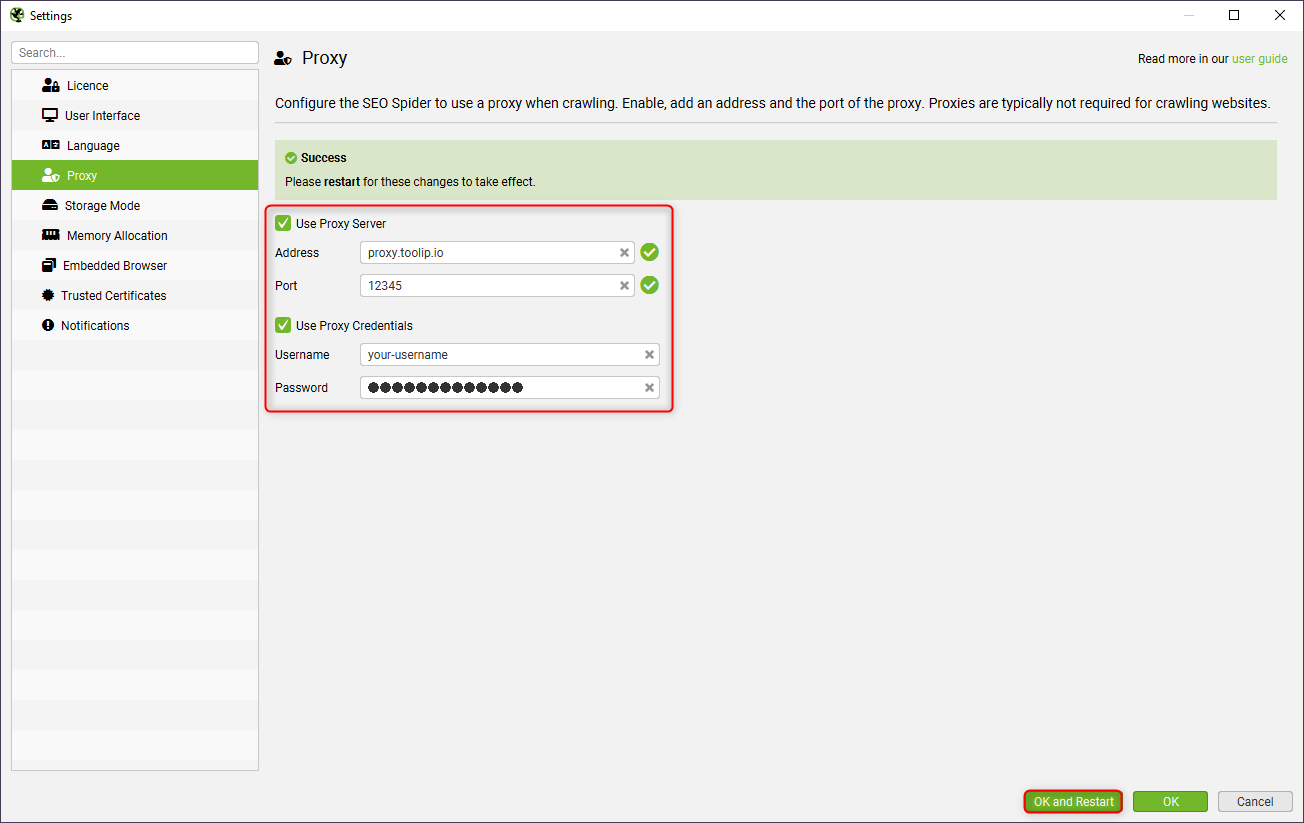
 1\. In the **Proxy Settings** window, check **Use Proxy Server** to enable proxy usage.
2\. If authentication is required, check **Use Proxy Credentials** and provide your Toolip login details.
3\. Enter the following details:
* **Address**: `proxy.toolip.io`
* **Port**: The port number from your [Toolip dashboard](https://toolip.io/dashboard/page/plans).
* **Username**: Your Toolip username.
* **Password**: Your Toolip password.
4\. Click **OK and Restart** to apply your proxy settings.
1\. In the **Proxy Settings** window, check **Use Proxy Server** to enable proxy usage.
2\. If authentication is required, check **Use Proxy Credentials** and provide your Toolip login details.
3\. Enter the following details:
* **Address**: `proxy.toolip.io`
* **Port**: The port number from your [Toolip dashboard](https://toolip.io/dashboard/page/plans).
* **Username**: Your Toolip username.
* **Password**: Your Toolip password.
4\. Click **OK and Restart** to apply your proxy settings.
 For geo-targeted proxies, append the country code to your username (e.g., `your-username-country-US`) to route through a specific region.
1\. Run a test crawl on a website.
2\. Check if the IP address corresponds to your Toolip proxy by visiting [httpbin.org/ip](http://httpbin.org/ip).
3\. If the displayed IP matches your proxy's IP, the configuration is successful.
With **Toolip** proxies integrated into **Screaming Frog**, you can now crawl websites securely, bypass restrictions, and conduct geo-specific SEO audits effortlessly. Optimize your web analysis while maintaining privacy and avoiding IP blocks!
For geo-targeted proxies, append the country code to your username (e.g., `your-username-country-US`) to route through a specific region.
1\. Run a test crawl on a website.
2\. Check if the IP address corresponds to your Toolip proxy by visiting [httpbin.org/ip](http://httpbin.org/ip).
3\. If the displayed IP matches your proxy's IP, the configuration is successful.
With **Toolip** proxies integrated into **Screaming Frog**, you can now crawl websites securely, bypass restrictions, and conduct geo-specific SEO audits effortlessly. Optimize your web analysis while maintaining privacy and avoiding IP blocks!