> ## Documentation Index
> Fetch the complete documentation index at: https://docs.toolip.io/llms.txt
> Use this file to discover all available pages before exploring further.
# How to Use Toolip with Safari
> Safari is the best way to experience the internet across all your Apple devices, offering powerful privacy protections and robust customization. By integrating Toolip and using proxies, you can further enhance your browsing by ensuring anonymity, accessing geo-restricted content, and adding an extra layer of security to your online activity.
Prefer an enterprise-grade guide? Learn more about Oculus Proxies Safari Integration Guide.
Targeting search engines like Google, Bing, or Yandex requires a specialized proxy to ensure stable access and avoid blocks. **Toolip’s Search Engine ISP Proxies** are designed specifically for this, providing reliable performance where standard proxies may fail. If your proxy test isn't working on search engines, switching to **Search Engine ISP Proxies** can resolve the issue.
## How to Set Up Toolip With Safari
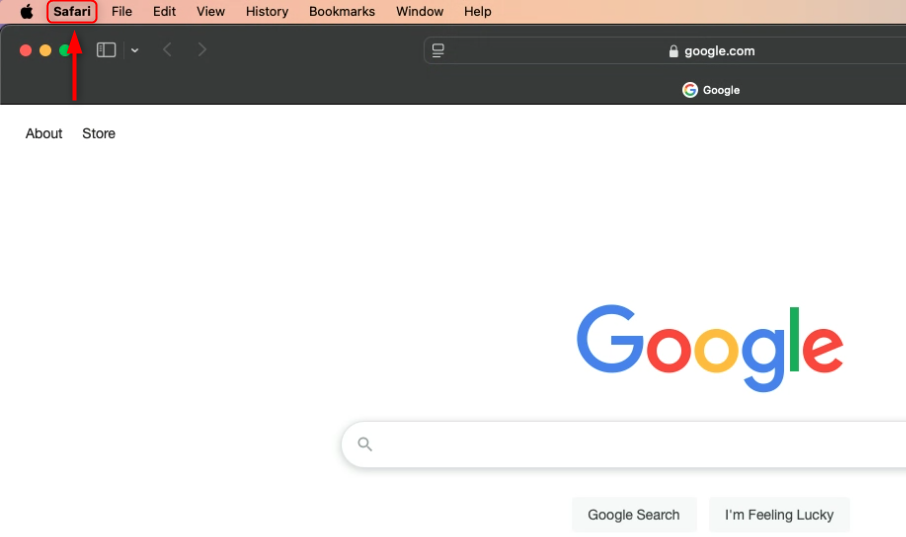
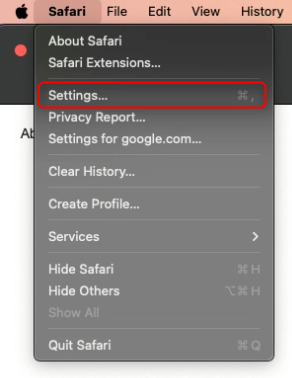
Launch Safari, click on **Safari** in the top menu bar, and select **Settings** (or press ⌘,).
 Go to the **Advanced** tab and locate the **Proxies** section, click **Change Settings**.
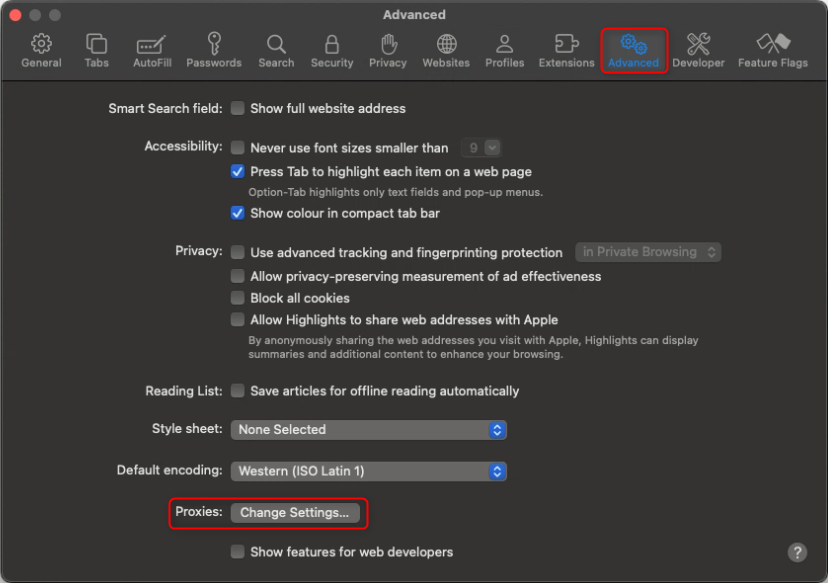 This will redirect you to your Mac’s system proxy settings. For detailed configuration instructions, refer to the [OS guide](https://docs.toolip.io/integration-guides/macos).