> ## Documentation Index
> Fetch the complete documentation index at: https://docs.toolip.io/llms.txt
> Use this file to discover all available pages before exploring further.
# How to Set Up Toolip With ParseHub
> Optimize your data extraction workflows with Toolip on ParseHub. This guide will walk you through configuring secure proxy connections for efficient and anonymous web scraping.
 ## What is ParseHub?
**ParseHub** is a powerful web scraping tool that allows users to extract data from websites with ease. It uses a visual point-and-click interface, making it accessible to both beginners and advanced users. With **Toolip**, you can enhance your scraping tasks by bypassing restrictions, avoiding IP blocks, and conducting geo-targeted scraping efficiently.
Prefer an enterprise-grade guide? Learn more about Oculus Proxies Parsehub Integration Guide.
Targeting search engines like Google, Bing, or Yandex requires a specialized proxy to ensure stable access and avoid blocks. **Toolip’s Search Engine ISP Proxies** are designed specifically for this, providing reliable performance where standard proxies may fail. If your proxy test isn't working on search engines, switching to **Search Engine ISP Proxies** can resolve the issue.
## How to Set Up Toolip With ParseHub
1\. Open **ParseHub** on your desktop or through the [web app](https://www.parsehub.com/).
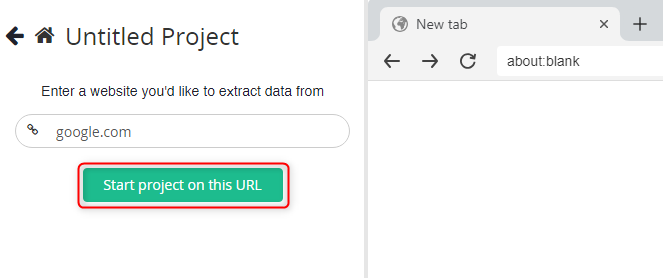
2\. Click on **New Project** and enter the website URL you want to scrape.
## What is ParseHub?
**ParseHub** is a powerful web scraping tool that allows users to extract data from websites with ease. It uses a visual point-and-click interface, making it accessible to both beginners and advanced users. With **Toolip**, you can enhance your scraping tasks by bypassing restrictions, avoiding IP blocks, and conducting geo-targeted scraping efficiently.
Prefer an enterprise-grade guide? Learn more about Oculus Proxies Parsehub Integration Guide.
Targeting search engines like Google, Bing, or Yandex requires a specialized proxy to ensure stable access and avoid blocks. **Toolip’s Search Engine ISP Proxies** are designed specifically for this, providing reliable performance where standard proxies may fail. If your proxy test isn't working on search engines, switching to **Search Engine ISP Proxies** can resolve the issue.
## How to Set Up Toolip With ParseHub
1\. Open **ParseHub** on your desktop or through the [web app](https://www.parsehub.com/).
2\. Click on **New Project** and enter the website URL you want to scrape.
 3\. Click **Start Project on this URL** to begin.
 1\. Toggle the **Browser** setting to *On*.
2\. In your project workspace, click on the **cogwheel icon** and select **Settings**.
1\. Toggle the **Browser** setting to *On*.
2\. In your project workspace, click on the **cogwheel icon** and select **Settings**.
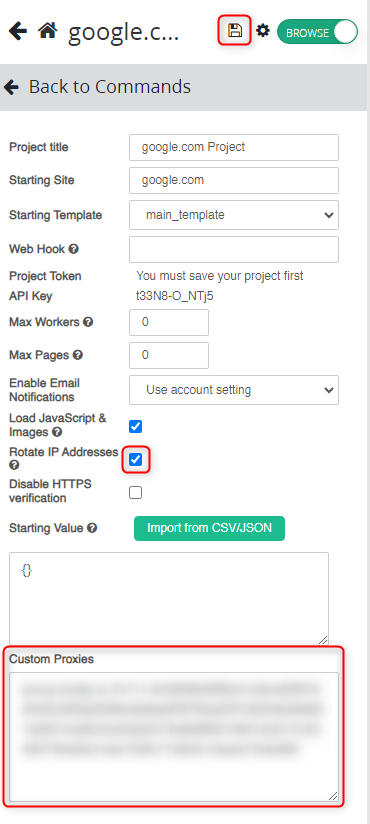
 1\. Enable the option **Rotate IP Addresses** for better anonymity.
2\. Go to your [Toolip dashboard](https://toolip.io/dashboard/page/plans) and click on **Show Configured List**.
3\. Under the **Generic** tab, copy the proxy code provided.
4\. Return to ParseHub and paste the proxy details into the **Custom Proxies** field.
5\. Click **Save** to apply your proxy settings.
1\. Enable the option **Rotate IP Addresses** for better anonymity.
2\. Go to your [Toolip dashboard](https://toolip.io/dashboard/page/plans) and click on **Show Configured List**.
3\. Under the **Generic** tab, copy the proxy code provided.
4\. Return to ParseHub and paste the proxy details into the **Custom Proxies** field.
5\. Click **Save** to apply your proxy settings.
 For geo-targeted proxies, include the country code in your username (e.g., `your-username-country-US`) to route traffic through a specific region.
With **Toolip** configured on **ParseHub**, you can enjoy secure and efficient data extraction. Whether you’re scraping content from geo-restricted websites or managing high-volume tasks, this setup ensures smooth, anonymous, and reliable scraping workflows.
For geo-targeted proxies, include the country code in your username (e.g., `your-username-country-US`) to route traffic through a specific region.
With **Toolip** configured on **ParseHub**, you can enjoy secure and efficient data extraction. Whether you’re scraping content from geo-restricted websites or managing high-volume tasks, this setup ensures smooth, anonymous, and reliable scraping workflows.