> ## Documentation Index
> Fetch the complete documentation index at: https://docs.toolip.io/llms.txt
> Use this file to discover all available pages before exploring further.
# How to Set Up Toolip With OpenBullet
> Enhance your automation workflows with Toolip on OpenBullet. This guide will help you configure Toolip for secure and efficient operations.
 ## What is OpenBullet?
**OpenBullet** is a powerful automation and testing tool often used for managing and testing HTTP requests, scraping data, and performing automated workflows. By integrating **Toolip**, you can ensure secure, private, and reliable connections while minimizing the risk of detection or bans.
Prefer an enterprise-grade guide? Learn more about Oculus Proxies Openbullet Integration Guide.
Targeting search engines like Google, Bing, or Yandex requires a specialized proxy to ensure stable access and avoid blocks. **Toolip’s Search Engine ISP Proxies** are designed specifically for this, providing reliable performance where standard proxies may fail. If your proxy test isn't working on search engines, switching to **Search Engine ISP Proxies** can resolve the issue.
## How to Set Up Toolip With OpenBullet
1\. Visit the [OpenBullet GitHub page](https://github.com/openbullet/OpenBullet2) and download the latest release.
2\. Extract the downloaded files and run the application on your system.
1\. From the OpenBullet dashboard, navigate to the **Proxies** tab.
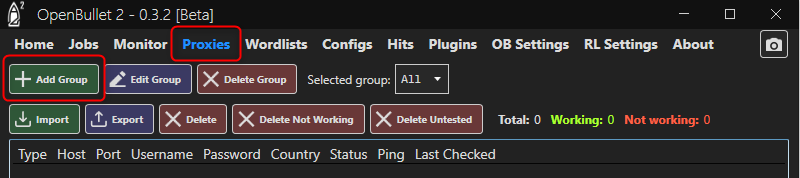
2\. Click **Add Group** to create a new group for your proxies.
## What is OpenBullet?
**OpenBullet** is a powerful automation and testing tool often used for managing and testing HTTP requests, scraping data, and performing automated workflows. By integrating **Toolip**, you can ensure secure, private, and reliable connections while minimizing the risk of detection or bans.
Prefer an enterprise-grade guide? Learn more about Oculus Proxies Openbullet Integration Guide.
Targeting search engines like Google, Bing, or Yandex requires a specialized proxy to ensure stable access and avoid blocks. **Toolip’s Search Engine ISP Proxies** are designed specifically for this, providing reliable performance where standard proxies may fail. If your proxy test isn't working on search engines, switching to **Search Engine ISP Proxies** can resolve the issue.
## How to Set Up Toolip With OpenBullet
1\. Visit the [OpenBullet GitHub page](https://github.com/openbullet/OpenBullet2) and download the latest release.
2\. Extract the downloaded files and run the application on your system.
1\. From the OpenBullet dashboard, navigate to the **Proxies** tab.
2\. Click **Add Group** to create a new group for your proxies.
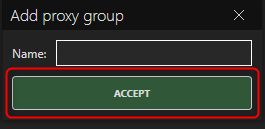
 3\. In the **Name** field, enter a descriptive name for the group to help you organize and identify it later.
4\. Click **Accept** to confirm and save the group.
3\. In the **Name** field, enter a descriptive name for the group to help you organize and identify it later.
4\. Click **Accept** to confirm and save the group.
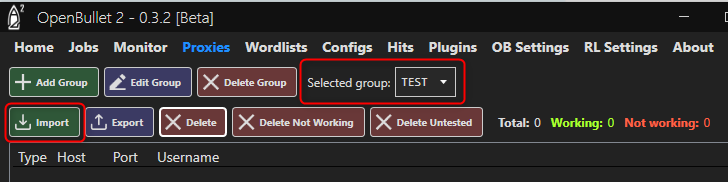
 1\. Select the group you just created from the proxy group list.
2\. Click **Import** to open the proxy configuration panel.
1\. Select the group you just created from the proxy group list.
2\. Click **Import** to open the proxy configuration panel.
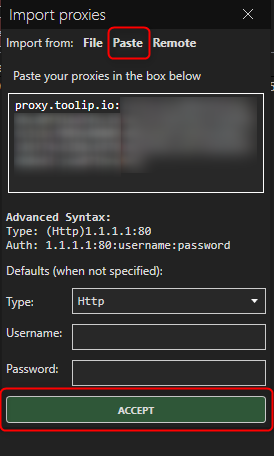
 3\. Switch to the **Paste** tab.
4\. Log in to your [Toolip dashboard](https://toolip.io/dashboard/page/plans) and click **Show Configured List**.
5\. Under the **Generic** tab, copy the provided proxy code.
6\. Return to OpenBullet and paste the proxy details into the proxies field.
7\. Click **Accept** to save your proxy settings.
3\. Switch to the **Paste** tab.
4\. Log in to your [Toolip dashboard](https://toolip.io/dashboard/page/plans) and click **Show Configured List**.
5\. Under the **Generic** tab, copy the provided proxy code.
6\. Return to OpenBullet and paste the proxy details into the proxies field.
7\. Click **Accept** to save your proxy settings.
 For country-specific proxies, adjust the username format to `your-username-country-XX` (e.g., `your-username-country-US`) to use a specific exit node.
By integrating **Toolip** with **OpenBullet**, you enhance your workflows with secure and anonymous connections. Whether automating tasks, testing applications, or scraping data, Toolip ensures reliable performance and privacy.
For country-specific proxies, adjust the username format to `your-username-country-XX` (e.g., `your-username-country-US`) to use a specific exit node.
By integrating **Toolip** with **OpenBullet**, you enhance your workflows with secure and anonymous connections. Whether automating tasks, testing applications, or scraping data, Toolip ensures reliable performance and privacy.