> ## Documentation Index
> Fetch the complete documentation index at: https://docs.toolip.io/llms.txt
> Use this file to discover all available pages before exploring further.
# How to Integrate Toolip With Maskfog
> Learn how to integrate Toolip with Maskfog to enhance privacy and streamline your account management. Follow this guide for a smooth setup experience.
 ## What is Maskfog?
**Maskfog** is an anti-detect browser designed for managing multiple accounts securely and anonymously. It provides tools to prevent detection, protect your digital footprint, and simulate unique browser environments for each profile. Integrating **Toolip** with Maskfog adds an extra layer of security and flexibility for geo-targeted activities.
Prefer an enterprise-grade guide? Learn more about Oculus Proxies Maskfog Integration Guide.
Targeting search engines like Google, Bing, or Yandex requires a specialized proxy to ensure stable access and avoid blocks. **Toolip’s Search Engine ISP Proxies** are designed specifically for this, providing reliable performance where standard proxies may fail. If your proxy test isn't working on search engines, switching to **Search Engine ISP Proxies** can resolve the issue.
## How to Integrate Toolip With Maskfog
1\. Visit the [Maskfog website](https://www.maskfog.com/) and download the application for your operating system.
2\. Install the software and log in using your credentials.
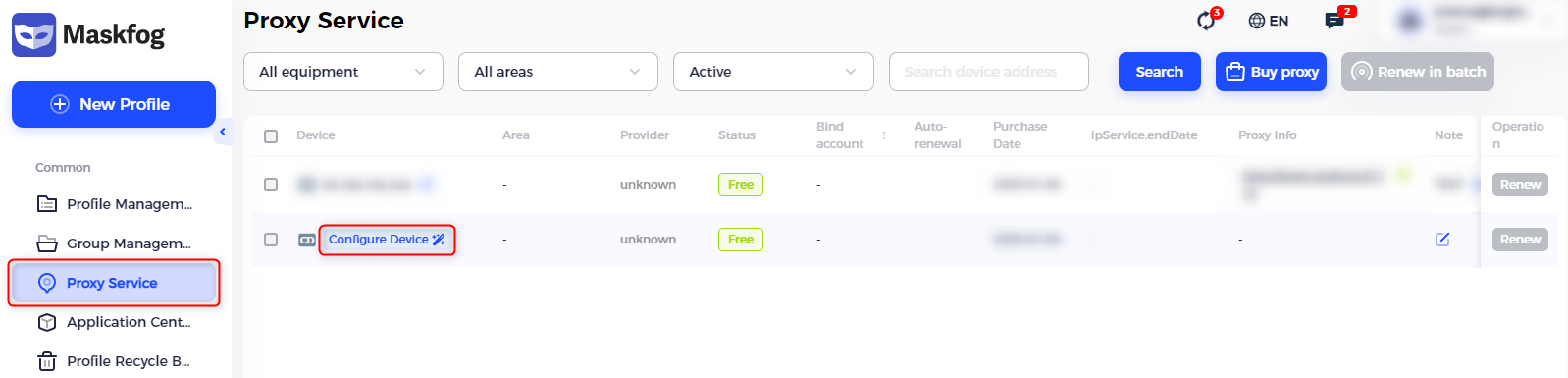
1\. Open Maskfog and navigate to the **Proxy Service** section.
2\. Click **Configure Device** to start setting up a new proxy.
## What is Maskfog?
**Maskfog** is an anti-detect browser designed for managing multiple accounts securely and anonymously. It provides tools to prevent detection, protect your digital footprint, and simulate unique browser environments for each profile. Integrating **Toolip** with Maskfog adds an extra layer of security and flexibility for geo-targeted activities.
Prefer an enterprise-grade guide? Learn more about Oculus Proxies Maskfog Integration Guide.
Targeting search engines like Google, Bing, or Yandex requires a specialized proxy to ensure stable access and avoid blocks. **Toolip’s Search Engine ISP Proxies** are designed specifically for this, providing reliable performance where standard proxies may fail. If your proxy test isn't working on search engines, switching to **Search Engine ISP Proxies** can resolve the issue.
## How to Integrate Toolip With Maskfog
1\. Visit the [Maskfog website](https://www.maskfog.com/) and download the application for your operating system.
2\. Install the software and log in using your credentials.
1\. Open Maskfog and navigate to the **Proxy Service** section.
2\. Click **Configure Device** to start setting up a new proxy.
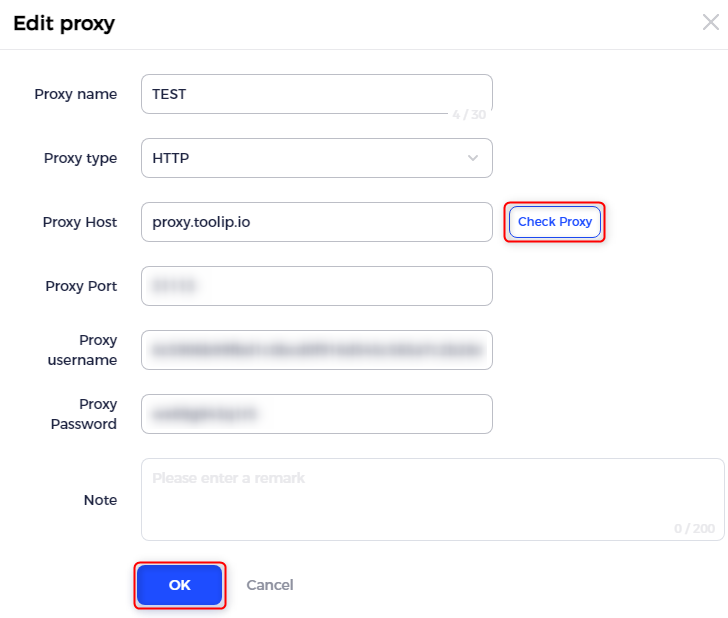
 1\. Enter a recognizable name in the **Proxy Name** field to identify the configuration later.
2\. Input the following details retrieved from your [Toolip dashboard](https://toolip.io/dashboard/page/plans):
* **Proxy Type**: Select `HTTP`, `HTTPS`, or `SOCKS5` based on your proxy type.
* **Proxy Host**: `proxy.toolip.io`
* **Proxy Port**: Use the port number provided in your Toolip dashboard.
* **Proxy Username**: Enter your Toolip username.
* **Proxy Password**: Enter your Toolip password.
3\. Test the proxy connection by clicking **Check Proxy**. Ensure the connection is successful before proceeding.
4\. After verifying, click **OK** to save the configuration.
1\. Enter a recognizable name in the **Proxy Name** field to identify the configuration later.
2\. Input the following details retrieved from your [Toolip dashboard](https://toolip.io/dashboard/page/plans):
* **Proxy Type**: Select `HTTP`, `HTTPS`, or `SOCKS5` based on your proxy type.
* **Proxy Host**: `proxy.toolip.io`
* **Proxy Port**: Use the port number provided in your Toolip dashboard.
* **Proxy Username**: Enter your Toolip username.
* **Proxy Password**: Enter your Toolip password.
3\. Test the proxy connection by clicking **Check Proxy**. Ensure the connection is successful before proceeding.
4\. After verifying, click **OK** to save the configuration.
 If you need proxies for a specific location, include the country code in your username. Format it as: `your-username-country-XX` (e.g., `your-username-country-US`) to select a proxy from the desired country.
1\. With your proxy successfully configured, return to the Maskfog dashboard.
2\. Apply the proxy settings to your desired profiles.
3\. Launch your browser session to start using Maskfog with Toolip.
You're All Set! With your proxy successfully configured, **Maskfog** is now equipped with **Toolip** for secure and anonymous connections. Enjoy enhanced privacy and seamless browsing.
If you need proxies for a specific location, include the country code in your username. Format it as: `your-username-country-XX` (e.g., `your-username-country-US`) to select a proxy from the desired country.
1\. With your proxy successfully configured, return to the Maskfog dashboard.
2\. Apply the proxy settings to your desired profiles.
3\. Launch your browser session to start using Maskfog with Toolip.
You're All Set! With your proxy successfully configured, **Maskfog** is now equipped with **Toolip** for secure and anonymous connections. Enjoy enhanced privacy and seamless browsing.