> ## Documentation Index
> Fetch the complete documentation index at: https://docs.toolip.io/llms.txt
> Use this file to discover all available pages before exploring further.
# How to Integrate Toolip With IXBrowser
> Streamline your account management and secure your browsing with Toolip and IXBrowser. Follow this guide to configure Toolip for a seamless and anonymous experience using IXBrowser.
 ## What is IXBrowser?
**IXBrowser** is a privacy-focused anti-detect browser designed for managing multiple accounts securely. It helps users bypass detection, avoid bans, and operate efficiently across different platforms. By integrating **Toolip**, you can enhance privacy, access geo-restricted content, and maintain a stable browsing environment.
Prefer an enterprise-grade guide? Learn more about Oculus Proxies Ixbrowser Integration Guide.
If you're using **Toolip** for search engines like **Google, Bing, or Yandex**, you may need **Search Engine ISP Proxies** for smooth access. Standard proxies might not perform well due to search engine restrictions.
## How to Integrate Toolip With IXBrowser
1\. Visit the [IXBrowser website](https://ixbrowser.com/) and download the application.
2\. Install the software and log in using your account credentials.
1\. Open **IXBrowser** and go to the **Profile List** section.
2\. Click **Create New Profile** to set up a new browser instance.
3\. Provide a descriptive name in the **Profile Name** field.
## What is IXBrowser?
**IXBrowser** is a privacy-focused anti-detect browser designed for managing multiple accounts securely. It helps users bypass detection, avoid bans, and operate efficiently across different platforms. By integrating **Toolip**, you can enhance privacy, access geo-restricted content, and maintain a stable browsing environment.
Prefer an enterprise-grade guide? Learn more about Oculus Proxies Ixbrowser Integration Guide.
If you're using **Toolip** for search engines like **Google, Bing, or Yandex**, you may need **Search Engine ISP Proxies** for smooth access. Standard proxies might not perform well due to search engine restrictions.
## How to Integrate Toolip With IXBrowser
1\. Visit the [IXBrowser website](https://ixbrowser.com/) and download the application.
2\. Install the software and log in using your account credentials.
1\. Open **IXBrowser** and go to the **Profile List** section.
2\. Click **Create New Profile** to set up a new browser instance.
3\. Provide a descriptive name in the **Profile Name** field.
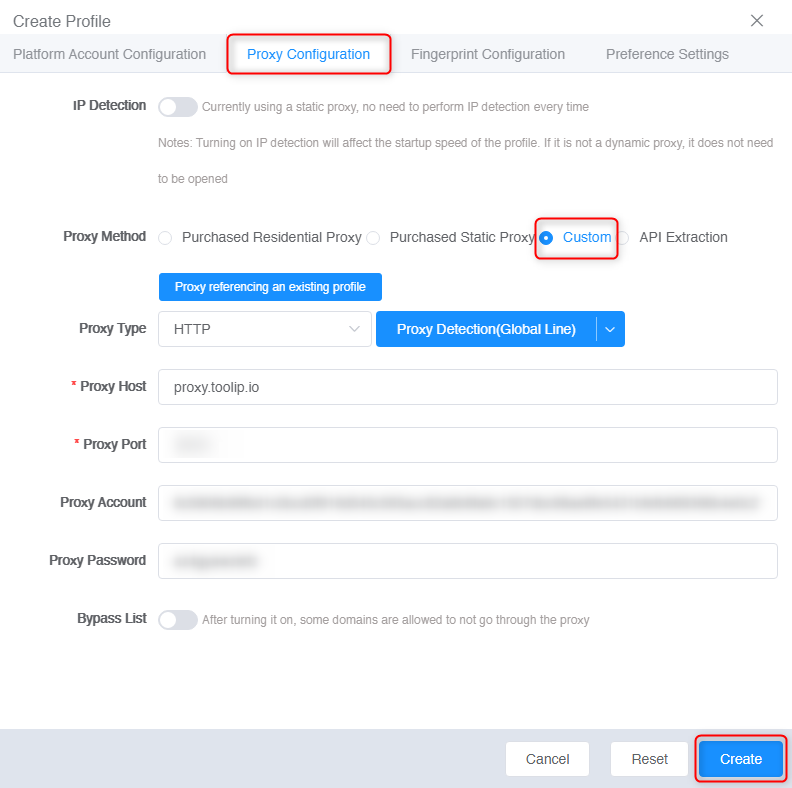
 1\. Open the **Proxy Configuration** tab in the profile setup.
2\. Toggle **Custom** to enable proxy options.
3\. Fill in the following details from your [Toolip dashboard](https://toolip.io/dashboard):
* **Proxy Type**: Select HTTP, HTTPS, or SOCKS5.
* **Proxy Host**: `proxy.toolip.io`
* **Proxy Port**: Use the port number from your Toolip dashboard.
* **Proxy Account**: Your Toolip username.
* **Proxy Password**: Your Toolip password.
4\. Click **Create** to save the proxy settings.
1\. Open the **Proxy Configuration** tab in the profile setup.
2\. Toggle **Custom** to enable proxy options.
3\. Fill in the following details from your [Toolip dashboard](https://toolip.io/dashboard):
* **Proxy Type**: Select HTTP, HTTPS, or SOCKS5.
* **Proxy Host**: `proxy.toolip.io`
* **Proxy Port**: Use the port number from your Toolip dashboard.
* **Proxy Account**: Your Toolip username.
* **Proxy Password**: Your Toolip password.
4\. Click **Create** to save the proxy settings.
 For geo-targeted proxies, format your username as `your-username-country-XX` (e.g., `your-username-country-US`) to access a specific region.
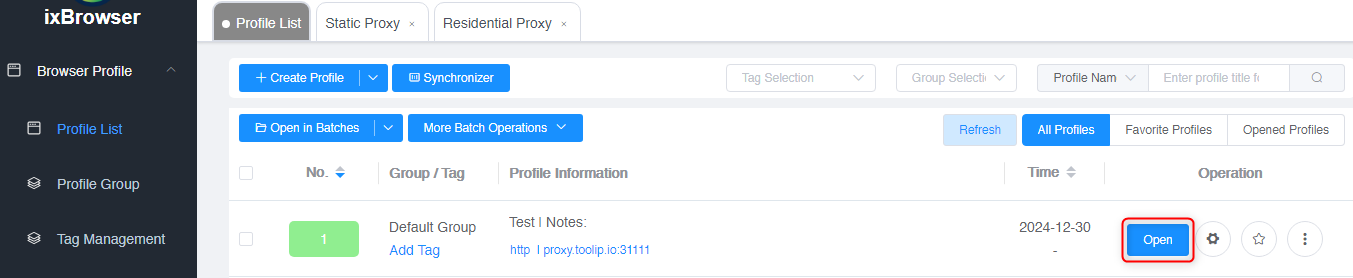
1\. Go to the **Profile List** section.
2\. Select your newly created profile.
3\. Click **Open** to launch the browser with your Toolip proxy settings.
For geo-targeted proxies, format your username as `your-username-country-XX` (e.g., `your-username-country-US`) to access a specific region.
1\. Go to the **Profile List** section.
2\. Select your newly created profile.
3\. Click **Open** to launch the browser with your Toolip proxy settings.
 By integrating **Toolip** with **IXBrowser**, you ensure secure, private, and seamless account management. Whether you’re managing multiple profiles or performing geo-targeted activities, this setup provides the anonymity and reliability you need for smooth browsing.