> ## Documentation Index
> Fetch the complete documentation index at: https://docs.toolip.io/llms.txt
> Use this file to discover all available pages before exploring further.
# How to Integrate Toolip With HideMyAcc
> Secure and streamline your browsing with Toolip and HideMyAcc. This guide walks you through configuring Toolip within HideMyAcc for private, reliable, and efficient account management.
 ## What is HideMyAcc?
**HideMyAcc** is an advanced anti-detect browser designed for managing multiple accounts securely. It helps users bypass restrictions, maintain anonymity, and avoid detection by offering a private browsing environment. Integrating **Toolip** enhances HideMyAcc's capabilities, providing secure and geo-targeted connections.
Prefer an enterprise-grade guide? Learn more about Oculus Proxies Hidemyacc Integration Guide.
Targeting search engines like Google, Bing, or Yandex requires a specialized proxy to ensure stable access and avoid blocks. **Toolip’s Search Engine ISP Proxies** are designed specifically for this, providing reliable performance where standard proxies may fail. If your proxy test isn't working on search engines, switching to **Search Engine ISP Proxies** can resolve the issue.
1\. Visit the [HideMyAcc website](https://hidemyacc.com/) and download the software compatible with your operating system.
2\. Install the application and log in with your account credentials.
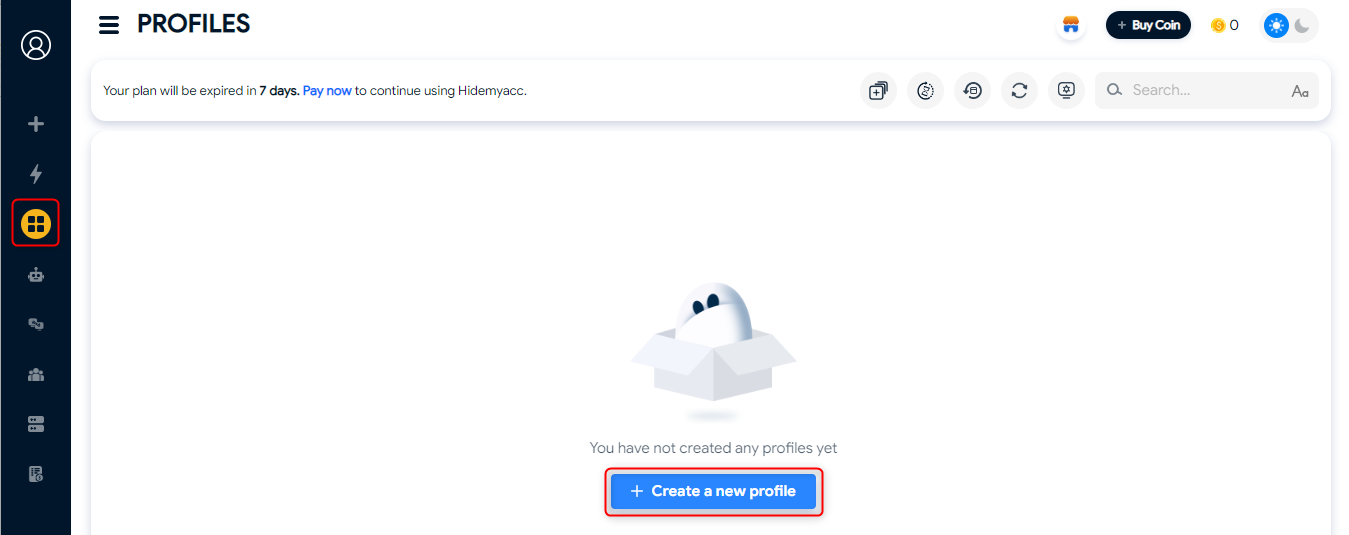
1\. Open **HideMyAcc** and navigate to the **Profiles** tab.
2\. Click **+Create a new profile** to set up a new browsing instance.
## What is HideMyAcc?
**HideMyAcc** is an advanced anti-detect browser designed for managing multiple accounts securely. It helps users bypass restrictions, maintain anonymity, and avoid detection by offering a private browsing environment. Integrating **Toolip** enhances HideMyAcc's capabilities, providing secure and geo-targeted connections.
Prefer an enterprise-grade guide? Learn more about Oculus Proxies Hidemyacc Integration Guide.
Targeting search engines like Google, Bing, or Yandex requires a specialized proxy to ensure stable access and avoid blocks. **Toolip’s Search Engine ISP Proxies** are designed specifically for this, providing reliable performance where standard proxies may fail. If your proxy test isn't working on search engines, switching to **Search Engine ISP Proxies** can resolve the issue.
1\. Visit the [HideMyAcc website](https://hidemyacc.com/) and download the software compatible with your operating system.
2\. Install the application and log in with your account credentials.
1\. Open **HideMyAcc** and navigate to the **Profiles** tab.
2\. Click **+Create a new profile** to set up a new browsing instance.
 1\. Locate the **Proxy** section within the profile creation page.
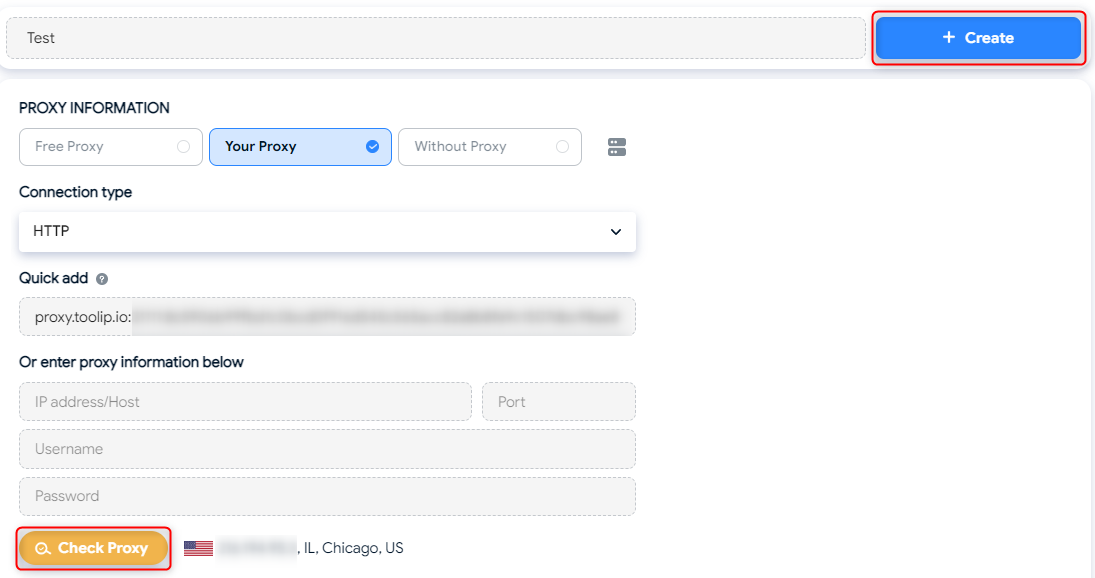
2\. In the profile settings, enter a **Profile Name** to easily identify it later.
3\. Toggle **Your Proxy** to activate the configuration options.
1\. Locate the **Proxy** section within the profile creation page.
2\. In the profile settings, enter a **Profile Name** to easily identify it later.
3\. Toggle **Your Proxy** to activate the configuration options.
 1\. Go to your [Toolip dashboard](https://toolip.io/dashboard) and click on the **Show Configured List** button.
2\. Under the **Generic** tab, copy the proxy code provided.
3\. Paste this code into the **Quick add** field in HideMyAcc.
4\. Click **Check Proxy** to verify the connection.
5\. Once the proxy configuration is verified, click **Create** to save your proxy settings.
1\. Go to your [Toolip dashboard](https://toolip.io/dashboard) and click on the **Show Configured List** button.
2\. Under the **Generic** tab, copy the proxy code provided.
3\. Paste this code into the **Quick add** field in HideMyAcc.
4\. Click **Check Proxy** to verify the connection.
5\. Once the proxy configuration is verified, click **Create** to save your proxy settings.
 For geo-specific proxies, format your username as `your-username-country-XX` (e.g., `your-username-country-US`) to target a specific region.
1\. Navigate to the **Profiles** tab.
2\. Select your newly created profile and click **Run** to start browsing securely with Toolip.
For geo-specific proxies, format your username as `your-username-country-XX` (e.g., `your-username-country-US`) to target a specific region.
1\. Navigate to the **Profiles** tab.
2\. Select your newly created profile and click **Run** to start browsing securely with Toolip.
 By integrating **Toolip** with **HideMyAcc**, you can enjoy enhanced privacy and seamless account management. Whether you're managing multiple profiles or performing geo-targeted tasks, this setup ensures your browsing experience is secure and efficient. Start today for reliable, private browsing! 🚀