> ## Documentation Index
> Fetch the complete documentation index at: https://docs.toolip.io/llms.txt
> Use this file to discover all available pages before exploring further.
# How to Set Up Toolip With Capsolver
> Integrate Toolip with Capsolver to enhance your CAPTCHA-solving workflows. Follow this guide to securely configure proxies for efficient and uninterrupted automation.
 ## What is Capsolver?
**Capsolver** is an advanced CAPTCHA-solving service that automates bypassing CAPTCHA challenges, making it essential for automated workflows. By integrating **Toolip**, you can solve CAPTCHAs securely, maintain anonymity, and access region-specific content with ease.
## Why Use Toolip With Capsolver?
✅ **Anonymity**: Protect your real IP address while solving CAPTCHAs.
🌍 **Geo-Targeting**: Use country-specific proxies to access regional CAPTCHA solutions.
🔗 **Reliable Connections**: Ensure uninterrupted CAPTCHA-solving for smooth automation.
Prefer an enterprise-grade guide? Learn more about Oculus Proxies Capsolver Integration Guide.
Targeting search engines like Google, Bing, or Yandex requires a specialized proxy to ensure stable access and avoid blocks. **Toolip’s Search Engine ISP Proxies** are designed specifically for this, providing reliable performance where standard proxies may fail. If your proxy test isn’t working on search engines, switching to **Search Engine ISP Proxies** can resolve the issue.
## How to Integrate Toolip With Capsolver
1\. Visit the [Capsolver website](https://www.capsolver.com/).
2\. Log in to your account to access the dashboard.
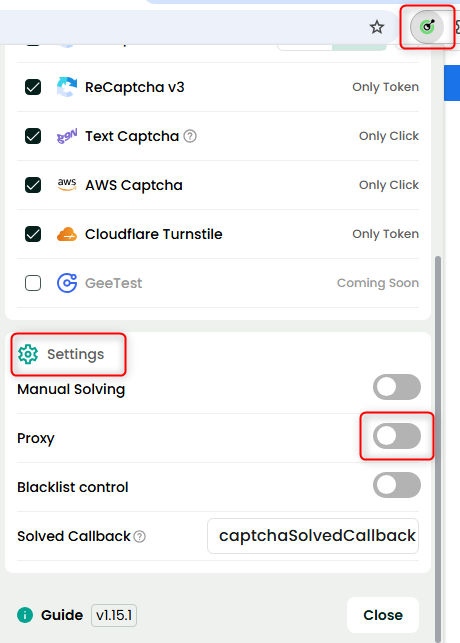
1\. Open the **Capsolver Extension**.
2\. Navigate to the **Settings** section.
3\. Locate the **Proxy** option and toggle it **On** to enable proxy settings.
## What is Capsolver?
**Capsolver** is an advanced CAPTCHA-solving service that automates bypassing CAPTCHA challenges, making it essential for automated workflows. By integrating **Toolip**, you can solve CAPTCHAs securely, maintain anonymity, and access region-specific content with ease.
## Why Use Toolip With Capsolver?
✅ **Anonymity**: Protect your real IP address while solving CAPTCHAs.
🌍 **Geo-Targeting**: Use country-specific proxies to access regional CAPTCHA solutions.
🔗 **Reliable Connections**: Ensure uninterrupted CAPTCHA-solving for smooth automation.
Prefer an enterprise-grade guide? Learn more about Oculus Proxies Capsolver Integration Guide.
Targeting search engines like Google, Bing, or Yandex requires a specialized proxy to ensure stable access and avoid blocks. **Toolip’s Search Engine ISP Proxies** are designed specifically for this, providing reliable performance where standard proxies may fail. If your proxy test isn’t working on search engines, switching to **Search Engine ISP Proxies** can resolve the issue.
## How to Integrate Toolip With Capsolver
1\. Visit the [Capsolver website](https://www.capsolver.com/).
2\. Log in to your account to access the dashboard.
1\. Open the **Capsolver Extension**.
2\. Navigate to the **Settings** section.
3\. Locate the **Proxy** option and toggle it **On** to enable proxy settings.
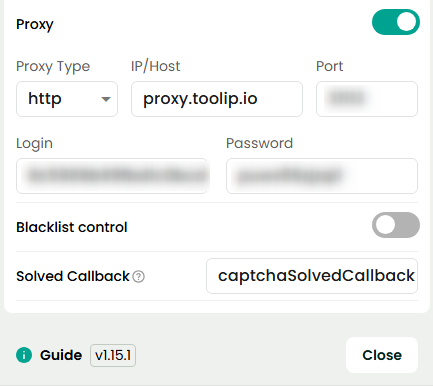
 1\. In the proxy settings, enter your **Toolip credentials**:
* **Host**: `proxy.toolip.io`
* **Port**: Use the port from your [Toolip dashboard](https://toolip.io/dashboard/page/plans).
* **Login**: Enter your Toolip proxy username.
* **Password**: Enter your Toolip proxy password.
1\. In the proxy settings, enter your **Toolip credentials**:
* **Host**: `proxy.toolip.io`
* **Port**: Use the port from your [Toolip dashboard](https://toolip.io/dashboard/page/plans).
* **Login**: Enter your Toolip proxy username.
* **Password**: Enter your Toolip proxy password.
 To use proxies from a specific country, adjust the username format: `your-username-country-XX` (e.g., `your-username-country-US`).
1\. Click **Test Proxy** to ensure the connection is active.
2\. Once verified, click **Save** to store the settings.
By integrating **Toolip** with **Capsolver**, you ensure **secure, efficient, and reliable CAPTCHA-solving workflows**. Whether you're automating tasks, handling bulk CAPTCHA requests, or bypassing geo-restrictions, this setup guarantees smooth and uninterrupted performance. Get started today! 🚀
To use proxies from a specific country, adjust the username format: `your-username-country-XX` (e.g., `your-username-country-US`).
1\. Click **Test Proxy** to ensure the connection is active.
2\. Once verified, click **Save** to store the settings.
By integrating **Toolip** with **Capsolver**, you ensure **secure, efficient, and reliable CAPTCHA-solving workflows**. Whether you're automating tasks, handling bulk CAPTCHA requests, or bypassing geo-restrictions, this setup guarantees smooth and uninterrupted performance. Get started today! 🚀