> ## Documentation Index
> Fetch the complete documentation index at: https://docs.toolip.io/llms.txt
> Use this file to discover all available pages before exploring further.
# How to Set Up Toolip With AdsPower
> Boost your web scraping and multi-account management with Toolip and AdsPower. Stay secure and undetectable as you manage multiple accounts effortlessly.
 ## What is AdsPower?
Take control of your multi-account management with **AdsPower**! This versatile browser is perfect for marketers, e-commerce businesses, and social media managers who need a secure, efficient way to handle multiple accounts at once. Each profile runs in its own isolated environment, keeping your activities discreet and safe from account suspensions or flags.
With AdsPower, you get unique digital fingerprints for every profile—things like IP address, device type, and user agent—ensuring your actions stay under the radar. Whether you’re scaling your e-commerce business, running social media campaigns, or working with affiliate marketing, AdsPower makes managing multiple accounts smooth and secure.
Prefer an enterprise-grade guide? Learn more about Oculus Proxies Adspower Integration Guide.
Targeting search engines like **Google, Bing, or Yandex** requires a specialized proxy to ensure stable access and avoid blocks. **Toolip’s Search Engine ISP Proxies** are designed specifically for this, providing reliable performance where standard proxies may fail. If your proxy test isn't working on search engines, switching to **Search Engine ISP Proxies** can resolve the issue.
## How to Integrate Toolip Proxies with AdsPower
1\. Visit the [AdsPower website](https://www.adspower.com/download).
2\. Download and install the application for your operating system.
3\. Once installed, log in to your account.
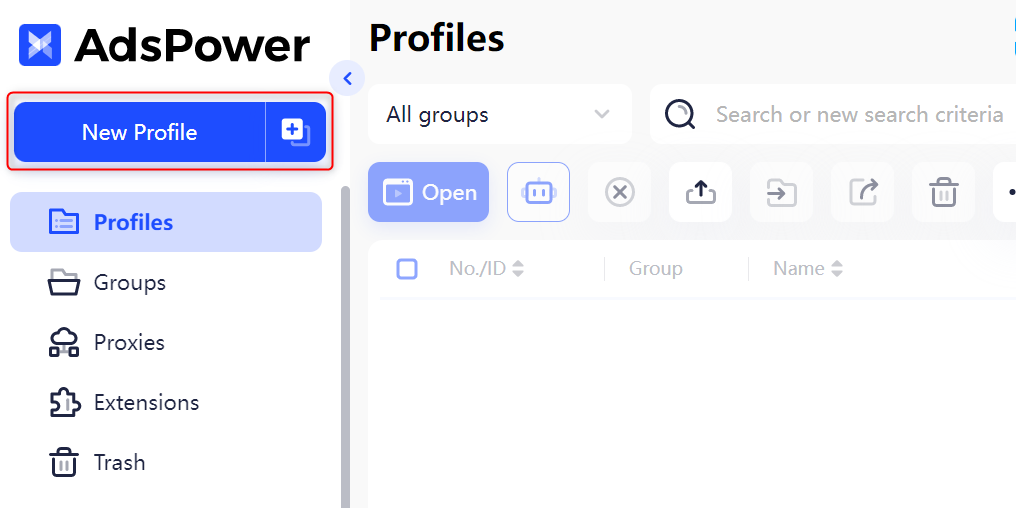
1\. Open AdsPower and click **New Profile** to create a new browser profile.
2\. Assign a name to the profile for easy identification.
## What is AdsPower?
Take control of your multi-account management with **AdsPower**! This versatile browser is perfect for marketers, e-commerce businesses, and social media managers who need a secure, efficient way to handle multiple accounts at once. Each profile runs in its own isolated environment, keeping your activities discreet and safe from account suspensions or flags.
With AdsPower, you get unique digital fingerprints for every profile—things like IP address, device type, and user agent—ensuring your actions stay under the radar. Whether you’re scaling your e-commerce business, running social media campaigns, or working with affiliate marketing, AdsPower makes managing multiple accounts smooth and secure.
Prefer an enterprise-grade guide? Learn more about Oculus Proxies Adspower Integration Guide.
Targeting search engines like **Google, Bing, or Yandex** requires a specialized proxy to ensure stable access and avoid blocks. **Toolip’s Search Engine ISP Proxies** are designed specifically for this, providing reliable performance where standard proxies may fail. If your proxy test isn't working on search engines, switching to **Search Engine ISP Proxies** can resolve the issue.
## How to Integrate Toolip Proxies with AdsPower
1\. Visit the [AdsPower website](https://www.adspower.com/download).
2\. Download and install the application for your operating system.
3\. Once installed, log in to your account.
1\. Open AdsPower and click **New Profile** to create a new browser profile.
2\. Assign a name to the profile for easy identification.
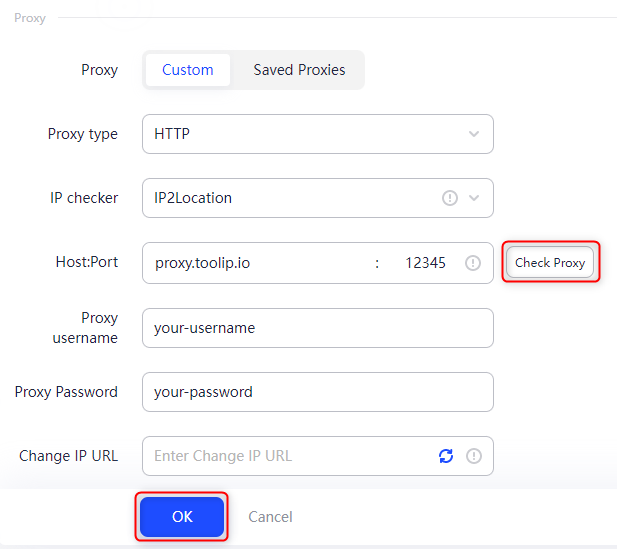
 1\. Navigate to the **Proxy Settings** section.
2\. Enter your Toolip proxy details:
* **Proxy Type**: Select `HTTP`, `HTTPS`, or `SOCKS5` based on your proxy type.
* **Proxy Host**: Enter `proxy.toolip.io`.
* **Proxy Port**: Use the port number provided in your [Toolip dashboard](https://toolip.io/dashboard/page/plans).
* **Proxy Username**: Input your Toolip username.
* **Proxy Password**: Input your Toolip password.
3\. Click **Check Proxy** to verify the connection.
4\. Ensure the setup is successful before proceeding.
5\. Click **OK** to save your proxy settings.
1\. Navigate to the **Proxy Settings** section.
2\. Enter your Toolip proxy details:
* **Proxy Type**: Select `HTTP`, `HTTPS`, or `SOCKS5` based on your proxy type.
* **Proxy Host**: Enter `proxy.toolip.io`.
* **Proxy Port**: Use the port number provided in your [Toolip dashboard](https://toolip.io/dashboard/page/plans).
* **Proxy Username**: Input your Toolip username.
* **Proxy Password**: Input your Toolip password.
3\. Click **Check Proxy** to verify the connection.
4\. Ensure the setup is successful before proceeding.
5\. Click **OK** to save your proxy settings.
 For geo-specific proxies, format your username as `your-username-country-XX` (e.g., `your-username-country-US`) to target a specific region.
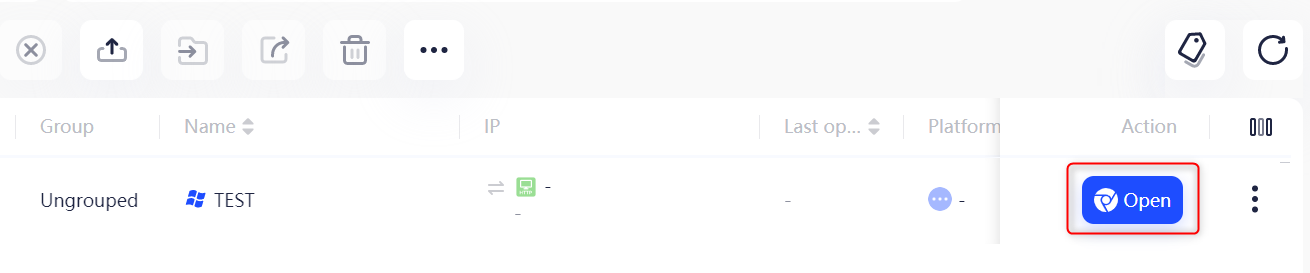
1\. Return to the profile list and locate the browser profile you configured.
2\. Click **Open** under **Tags** to launch the browser with your Toolip proxy.
For geo-specific proxies, format your username as `your-username-country-XX` (e.g., `your-username-country-US`) to target a specific region.
1\. Return to the profile list and locate the browser profile you configured.
2\. Click **Open** under **Tags** to launch the browser with your Toolip proxy.
 That’s it! You’ve successfully set up **Toolip with AdsPower**. Your browser is now configured for secure and anonymous browsing, giving you the flexibility and control you need for your tasks.